A New Solution to Understanding What Your Digital Audio System Is Doing With the Data Stream - Part 3
A few weeks ago we reposted Ferenc Koscsó's article introducing a minimalist, bit-perfect music player, written in C, with a single purpose: to deliver the music file data stream to the DAC by the shortest, most deterministic path, untouched, in its original form. His efforts offer an open-source, free to use, program for both the macOS and Linux that he calls bpplay ("bit perfect play"). You can read Part 1 in the series HERE, and Part 2 in the series HERE.
Now, with Ferenc's permission, we repost his third article in this series in which he discusses the software developed for his bit-perfect music player and comparisons to other software solutions.
Platforms, Languages, and Real-World Development — Part 3
By: Ferenc Koscsó
Original article posted HERE. Reposted with Ferenc Koscsó's kind permission.
A few weeks ago I set out on a big experiment: I decided that, despite being a non-expert, I would write software—software that meets audiophile expectations.
Two blog posts on the subject have already appeared: the first one can be read here, and the second one at this link.
As the previous two pieces made clear, bpplay represents a previously almost non-existent, entirely new generation of DIY (do-it-yourself) software. One of the most important motivations behind the project is precisely to demonstrate a paradigm shift: that with the help of large language models (LLMs), almost anyone today can very likely create applications of this kind, tailored to specific needs — without a professional programming background or software-architecture experience. In the age of AI-assisted development, clean engineering concept and precise problem recognition have become more important than syntax-level coding routine.
When an engineer or a determined DIY developer begins designing a more serious audiophile music player, two fundamental questions arise almost immediately:
- Which operating system’s internal architecture provides the transparent, direct path for the audio bits all the way to the physical output?
- What language and developer foundations are worth building on, so that the application is not merely a working prototype, but software that is maintainable over the long term, secure, and extensible to multiple platforms?
The bpplay prototype was written in pure C, both in language and in concept. This choice perfectly reflects the classic, conservative mindset that prioritizes the shortest signal path and direct hardware access. While the C-based approach is generally valid today, modern software architecture also offers alternatives that can raise development efficiency and safety to a new level with minimal compromise. In this article we examine, all at once, the audio subsystems of modern operating systems, the inner workings of the best-known audiophile players on the market, and the real-time capabilities of development environments.
The software criteria for bit-perfect, fully memory-based playback
Regardless of which operating system we work under, the software architecture must satisfy three strict conditions in order to eliminate hardware current spikes and any timing errors that might arise from them:
- Monolithic RAM allocation and memory locking: The entire audio material must be loaded into system memory before playback begins. The memory block must then be locked at the operating-system kernel level (e.g. with mlock() or mlockall() on POSIX systems, or VirtualLock on Windows). This prevents the OS virtual-memory manager from moving the block to the slow paging file (swap), which would cause critical delays—so-called page faults—during playback.
- Exclusive hardware access: The system’s internal software mixer engines must be bypassed entirely, giving direct access to the internal buffers of the hardware interface (the DAC).
- Non-blocking real-time thread: On the actual audio-rendering thread (audio thread), any I/O operation, network call, or dynamic memory allocation is strictly forbidden at the moment of playback.
Platform differences: macOS vs. Linux vs. Windows
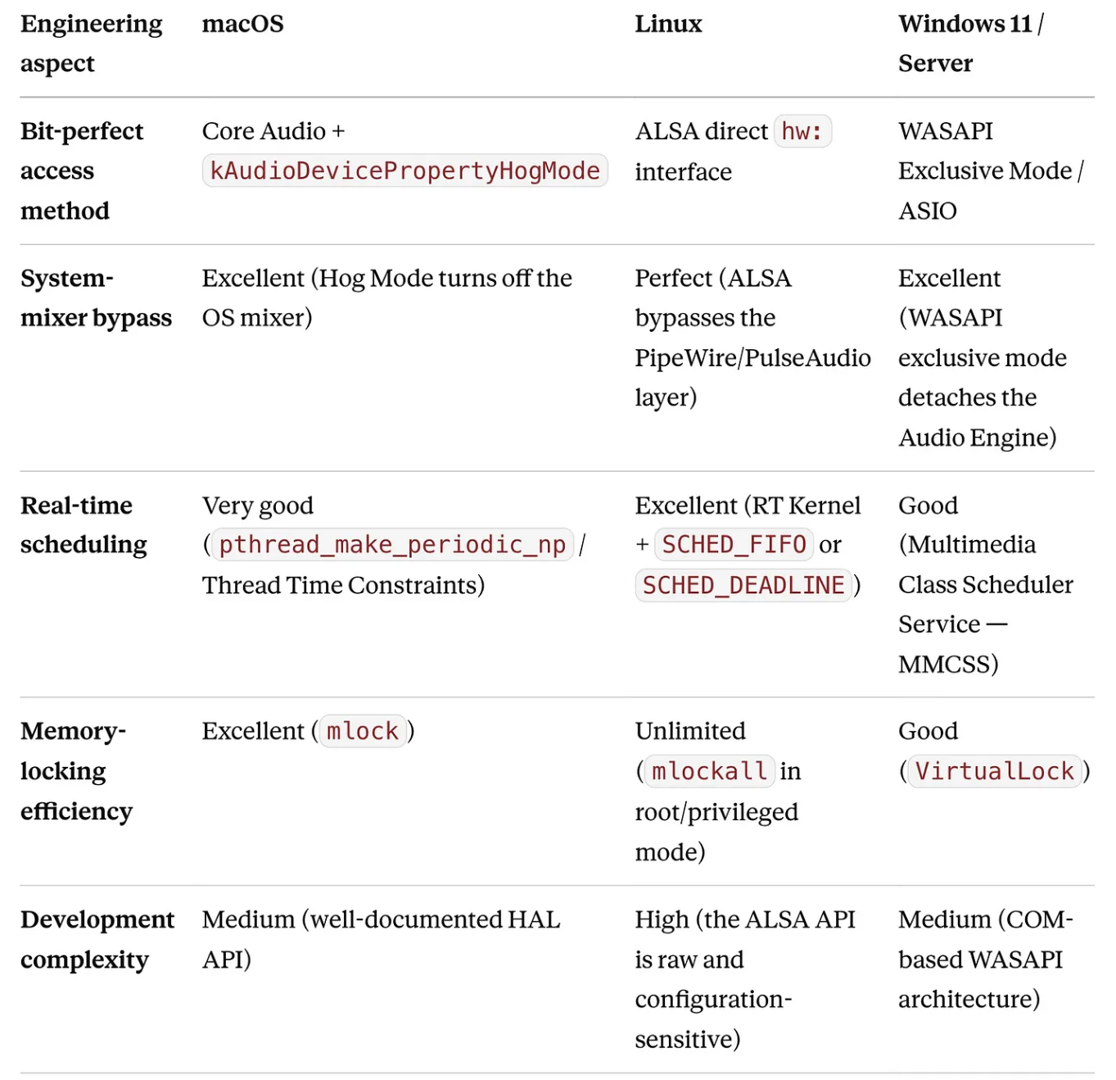
To see where and how these requirements can be met, it is worth comparing the three main platforms at the system level.
The verdict is clear: while Linux offers the rawest and most deterministic control (especially on headless, GUI-less target devices), the macOS Core Audio subsystem likewise provides a stable and unified high-level hardware abstraction.
Integer mode vs. 32-bit float dilemma — across macOS, Linux, and Windows
A recurring question in audiophile software development is the difference between integer mode and 32-bit float transmission. For a long time there was a misconception that if the software or the system converts the signal to floating point, bit-perfection is lost. The reality differs radically by operating system and driver architecture.
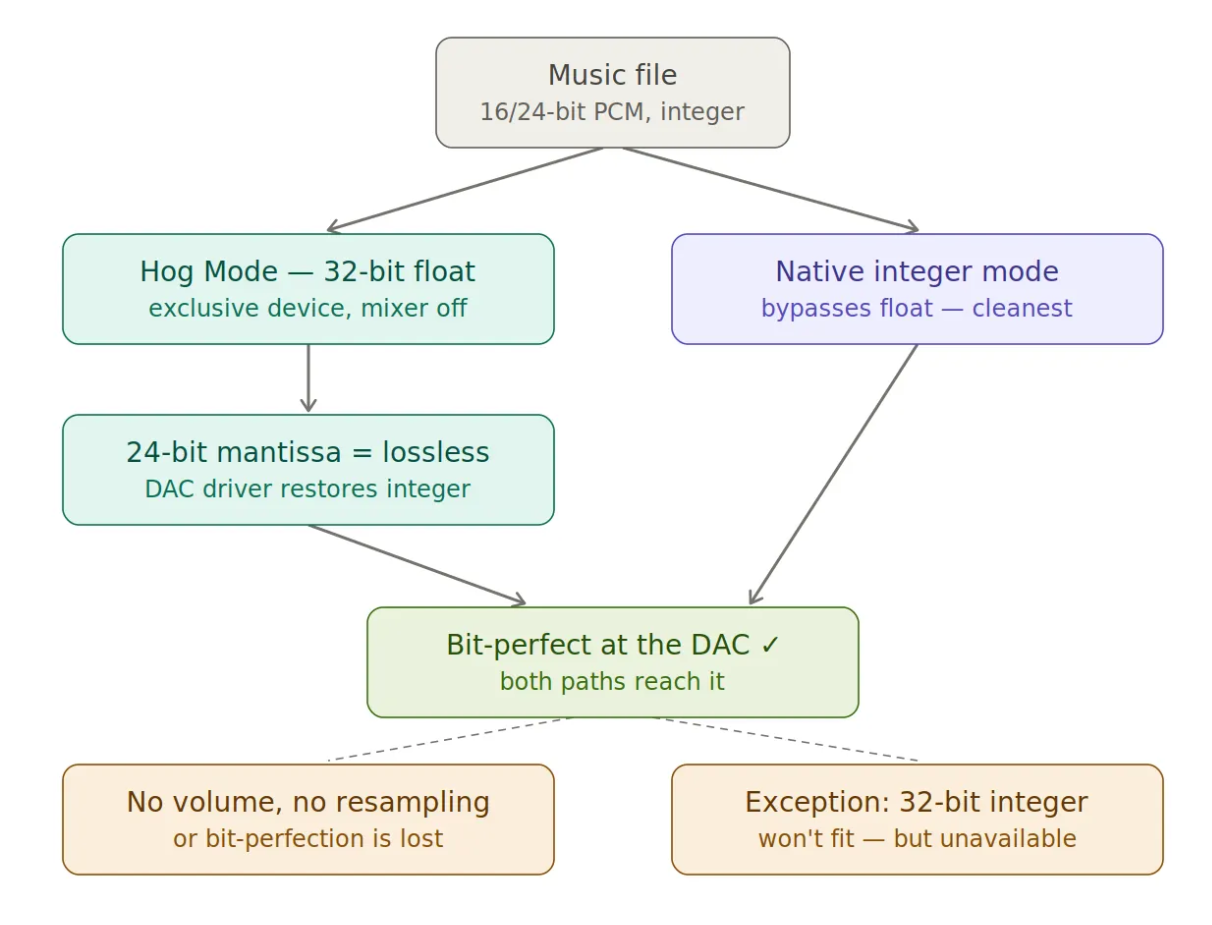
macOS: transparent floating-point handling. Core Audio works natively with a 32-bit floating-point architecture. By activating Hog Mode, the software takes exclusive ownership of the physical device and disables the system mixer. In this state, the 32-bit float output remains, in practice, bit-perfect, provided that there is no software volume control or resampling in the chain.
The 32-bit floating-point format standard (IEEE 754) has a 24-bit mantissa. This means that any 16- or 24-bit fixed-point (integer) musical data can be mapped losslessly, bit-for-bit, into the floating-point domain, and then—upon reaching the DAC’s hardware driver—converted back to the original integer format without distortion. Although native integer mode (which bypasses float conversion entirely) is in theory the cleanest path, float transmission under Hog Mode also provably yields a bit-perfect result. This holds true right up until we want to play back audio files that use 32-bit integer arithmetic—but such files are, commercially, essentially unavailable (apart from a few isolated, specialist labels).
Linux: the hardware integer reality. In the Linux world, if we strive for true bit-perfection and bypass the PipeWire or PulseAudio subsystems via the ALSA direct hardware interface (hw:X,Y), the question is settled at once. Consumer and professional DAC interfaces simply do not support hardware-level floating-point decoding. The hardware accepts only native fixed-point (integer) formats (such as S16_LE, S24_3LE, or S32_LE).
Although the modern PipeWire subsystem internally mixes and dithers in 32-bit float to preserve dynamic range, if—like bpplay—we write directly to the ALSA hardware buffer, float transmission is a physical impossibility: the software must send the samples in exactly the integer format the DAC expects, otherwise the hardware rejects the stream. So on the direct hardware signal path there is no float alternative.
Windows: ASIO integer vs. the WASAPI hybrid approach. The Windows Audio Engine mixer also uses 32-bit float format in shared mode. In exclusive modes, however, the architecture splits in two:
- ASIO (Audio Stream Input/Output): This professional, vendor-specific driver model is strictly integer-based (ASIOSTInt16LSB, ASIOSTInt32LSB, etc.). It maps the software's memory blocks directly, copy-style, into the hardware's integer buffers, so the question of float conversion never even arises.
- WASAPI Exclusive: By bypassing the system mixer entirely, it establishes a direct connection with the audio driver. WASAPI exclusive mode can negotiate with the driver: if the DAC’s driver advertises 32-bit float support as a software container, transmission can also take place over the float path (which, as on macOS, remains bit-perfect thanks to the IEEE 754 standard). Even so, the cleanest approach here too is to query and serve the hardware’s native integer bit depth (e.g. 24-bit or 32-bit integer) directly.
The great DSD mystery: Native DSD vs. DoP (DSD over PCM)
While PCM (Pulse Code Modulation) describes the sound wave with a sampling frequency and bit depth, DSD (Direct Stream Digital) uses a completely different, 1-bit pulse-density modulation (PDM) at a gigantic sampling rate (e.g. 2.8224 MHz for DSD64). Physically transporting this 1-bit stream from the source to the DAC creates a major fault line between operating systems.
What is the difference between Native DSD and DoP?
- Native DSD: The player software and the operating-system driver send the 1-bit data stream resting in the music file as a raw bitstream, without any conversion or structural modification, over the USB interface to the DAC’s dedicated DSD decoder chip.
- DoP (DSD over PCM): It is important to clarify: DoP does NOT convert DSD into a PCM audio signal. DoP is merely a clever transport container (a packaging method), created because the software architecture of certain operating systems is incapable of carrying raw 1-bit streams. A 24-bit PCM frame is used as the carrier: in the upper 8 bits a special, continuously alternating identifier signal (a so-called marker: 0x05 and 0xFA, alternating frame by frame) is placed, while the raw DSD data is packed into the lower 16 bits. When this frame arrives at a DoP-compatible DAC, the hardware recognizes the marker in the upper 8 bits, immediately knows that this is not PCM audio, strips off the "packaging," and sends the remaining 16-bit pure DSD stream to the DSD core.
The price of DoP is bandwidth overhead. Of the 24-bit frame, 8 bits are the marker, so one-third (33%) of the DoP frame is overhead; relative to native transmission — where there is no marker—this means exactly 50% more bandwidth (24/16 = 1.5×). This means that to transmit a DSD64 stream, the machine must simulate the data rate of a 176.4 kHz, 24-bit PCM stream.
DSD handling by operating system
macOS: Apple’s Core Audio subsystem is rigidly PCM-centric, and its API does not directly support the transmission of native 1-bit data. Because of this, over a direct USB connection native DSD is not feasible in the Mac environment; the only bit-perfect path is DoP. Since DoP wastes bandwidth, and since the macOS Core Audio factory sampling limit is widely assumed to be 768 kHz, the resolution transferable via DoP would in principle stop at DSD256 (which requires a 705.6 kHz PCM carrier frame).
The Mac and the reality of ultra-high sampling: Although it is commonly believed that the Mac is incapable of sending higher resolutions (DSD512, DSD1024) directly over a USB cable, specialized software such as HQPlayer can break through this wall. If we look, for example, at the XMOS USB interface chip inside the famous Holo Spring II DAC (which officially does not support native 1-bit transmission higher than DSD256 for lack of a Mac driver), the system is nonetheless able to receive DSD1024 directly over USB—without any network protocol (NAA)—from HQPlayer running on a Mac.
Holo Audio and the XMOS behind-the-scenes magic
XMOS chips (such as the XU208 or custom variants) are not fixed-function, rigid circuits. In reality, the XMOS is a software-programmable, multi-core, real-time RISC microcontroller. On its own, the XMOS chip is a blank slate: its capabilities and endpoint descriptors are determined by the custom firmware the manufacturer burns onto it.
Jeff Zhu (the designer of Holo Audio) wrote, during the development of the Spring II DAC, an extremely optimized, custom firmware for the XMOS chip — one capable of communicating transparently with the built-in, factory USB Audio Class 2 (UAC2) driver of macOS. When we connect the Spring II to a Mac (which, incidentally, received a USB 3.0 Type-B form-factor connector, while the link itself operates at USB 2.0 High Speed), the XMOS chip reports to the Core Audio subsystem that it is a standard UAC2 device capable of handling ultra-high PCM frequencies as well.
The numbers and the physics do not lie:
The clock rate of DSD1024 is brutal: 45.1584 MHz.
Since the Mac cannot send a 1-bit stream directly, HQPlayer had to wrap it into a DoP container. DoP places an 8-bit identifier marker on top of every 16 bits of DSD data, giving us a 24-bit PCM frame.
To carry this over the 16-bit payload frame, the Mac must simulate a 2.8224 MHz (2822.4 kHz) PCM carrier frequency:
45.1584 MHz / 16 bit = 2.8224 MHz
Is the bandwidth of the USB 2.0 protocol sufficient for this?
Yes! The physical bandwidth requirement of a 2.8224 MHz, 24-bit stereo PCM stream is about 135.5 Mbps. Since the theoretical maximum of USB 2.0 High Speed is 480 Mbps (in reality roughly 280–320 Mbps of stable throughput), the physical size of the DSD1024 DoP stream is easily handled over the USB cable.
Because the macOS Core Audio HAL (Hardware Abstraction Layer) and the built-in factory UAC2 driver contain no hard-coded software ceiling (that would say "stop at 768 kHz"), if the connected XMOS firmware signals the ability to receive the 2.8224 MHz packet, the Mac opens this gigantic data channel without any objection. The third key player in the story is the developer of HQPlayer, Jussi Laako, who did not use the standard, high-level windowing APIs of macOS, but sent the frames—chopped into 16-bit blocks and tagged with the DoP marker—directly to the HAL device wrapper. The XMOS chip, thanks to its tightly matched internal clock, then forwarded this as raw data, without delay, to the Spring II DAC’s internal, custom FPGA-based R-2R network and the dedicated DSD module.
Linux: ALSA supports native DSD streams at the kernel level (e.g. with registers of the SNDRV_PCM_FORMAT_DSD_U32_LE format). If the USB DAC in use and its Linux driver (the snd-usb-audio module) contain the native DSD identifier mapping for that particular hardware, Linux sends DSD natively, without any bandwidth waste, all the way up to the gigantic DSD512 or DSD1024 levels. If the driver does not know the DAC's native mapping, ALSA can fall back to DoP mode.
Windows: WASAPI Exclusive does not natively handle the 1-bit stream, so DoP is the limit there too. If, however, we install the DAC manufacturer’s official ASIO driver on Windows, ASIO bypasses the Windows audio subsystems entirely and allows the player software to place the raw 1-bit data directly into the hardware’s native integer/DSD buffers. Thus, under Windows with ASIO, full native DSD512/1024 playback is achievable.
Comparing well-known audiophile platforms
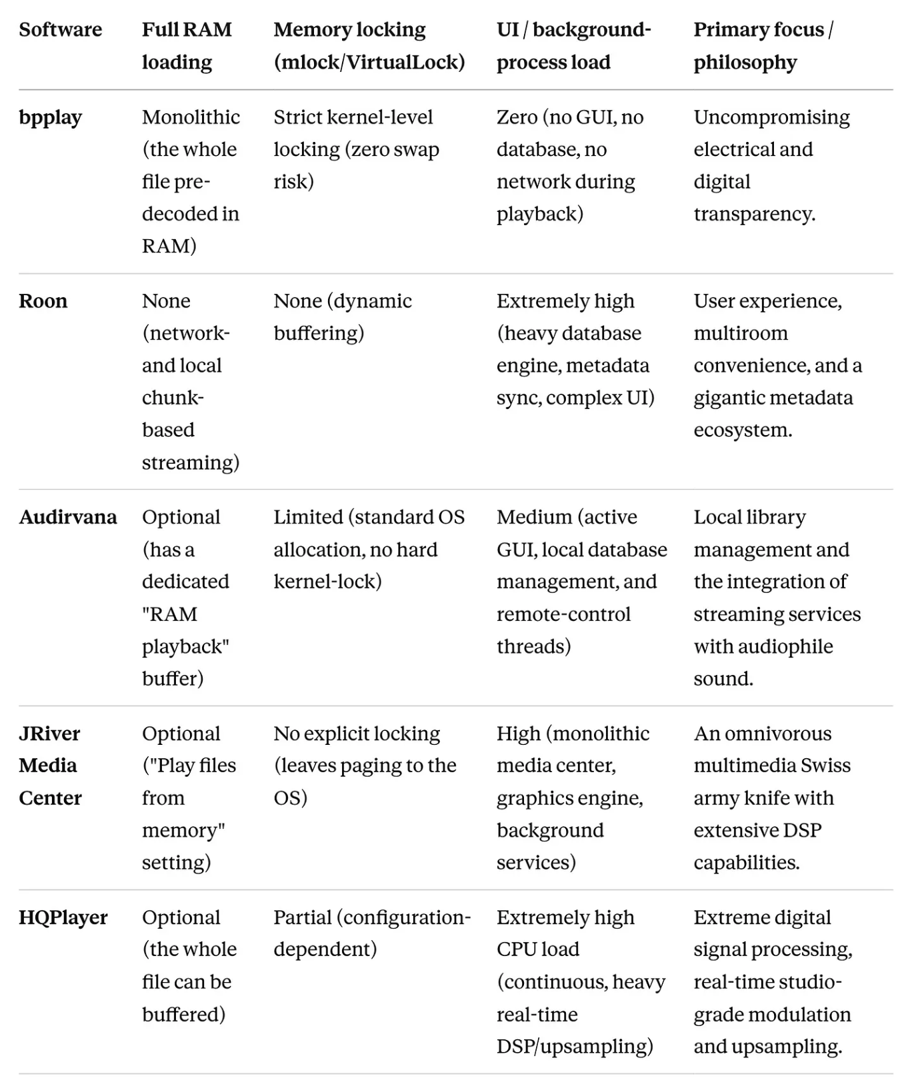
To put bpplay’s ascetic design in context, it is worth examining how the market’s most popular commercial and high-end software approach memory management, signal purity, and DSD transport.
Methodological note: For this comparison we considered primarily those well-known, premium audiophile platforms that can run cross-platform, on multiple operating systems. This matters because bpplay’s long-term goal is also multi-platform operation, so the architectural compromises of the big software houses offer direct lessons for designing our own architecture.
Architecture analysis
- Roon: Although Roon uses its own RAAT (Roon Advanced Audio Transport) protocol for bit-perfect transmission, its design philosophy is the opposite of bpplay’s. The Roon Core continuously indexes, handles network packets, and renders images. The music arrives at the endpoint in a streaming-like fashion, in chunks, so the network card and I/O are constantly active. There is no memory locking, and database operations can cause CPU spikes at any time.
- Audirvana: Engineering-wise it is closer to bpplay if we enable RAM buffering. In that case the software tries to read the file into memory, reducing disk activity. However, Audirvana still runs as a standard user-level application: the GUI and the network threads of the background remote app (Remote App) constantly force the CPU into context switches. Lacking kernel-level mlock, the system may swap at critical moments.
- JRiver: Its "Play from memory" function lifts the raw PCM data into RAM, effectively reducing storage load during playback. At the same time, JRiver is a huge, monolithic software package (media-centric, video player, network server). Because of background plugins and a complex graphics engine, power-side consumption ripple and EMI noise levels can remain high.
- HQPlayer: A unique, radical solution. It can run the entire file from memory, but unlike bpplay it does not aim for software asceticism—it aims for raw computational power. HQPlayer can convert everything in real time to enormous-resolution DSD or PCM, using complex poly-phase filters. This gigantic CPU load generates huge current-draw spikes and heat, which can make the computer electromagnetically "noisy" even when disk operations have dropped to zero.
Programming languages and real-time runtime environments
bpplay’s current C-based approach guarantees the lowest possible software footprint. However, manual memory management (malloc, free, pointer arithmetic) carries risks from the standpoint of modern development expectations and safety. Today's programming-language ecosystem already offers a number of alternatives.
C — classic minimalism.
- Pros: Zero overhead, absolute transparency, no hidden abstraction.
- Cons: Lower-level memory-management safety, cross-platform porting is cumbersome, and code maintainability degrades exponentially in complex systems.
Rust—the modern benchmark that also supports real-time playback.
- Pros: Rust’s ownership model guarantees memory safety at compile time without using a runtime garbage collector (GC). Since there is no GC, there are no unpredictable runtime pauses, making Rust perfectly suited for writing critical, real-time audio engines. Its cross-platform support is also outstanding.
- Cons: A steep learning curve, and complex syntax for hardware-close pointer manipulation.
Swift & SwiftUI — champion of the user experience.
- Pros: Beautiful, native macOS interfaces can be built with it at lightning speed. Modern AI-assisted development tools support SwiftUI code generation extremely effectively.
- Cons: Swift uses Automatic Reference Counting (ARC). ARC can invoke hidden atomic operations and memory deallocations in the background, which is distinctly harmful on a strict real-time audio-rendering thread, since it can cause unpredictable microsecond-scale delays (jitter).
The LLM (Large Language Model) ecosystem in practice — where do we start DIY development?
If we are not trained software-development professionals (I am not either), but we would like to build a bit-perfect player application tailored to specific needs like bpplay, today’s AI tools open up entirely new horizons for us. There is no need to learn the Core Audio HAL API or ALSA configurations from scratch; the key is choosing the right supporting environment:
- Google AI Studio (Gemini models): An excellent starting point for conceptual design and for understanding complex factory audio architectures. Gemini’s enormous context window makes it possible to paste in entire operating-system-level audio documentation, or even the complete source files of existing open-source C projects, all at once. It can grasp the entire structure in one step and produce a logical plan — even for the Rust engine.
- Cursor / Windsurf (AI-native IDEs): Currently the most efficient development environments for actually writing code. These code editors, built directly around LLMs (Claude Sonnet/Opus 4.x, GPT, GLM 5.2), can navigate a project’s folder structure autonomously. If you issue the command, “Implement a POSIX mlockall memory lock before the Rust audio thread starts," the IDE not only writes the code but also sets up the required dependencies in the background.
- Claude Code (Agentic CLI): A radically new approach to agentic coding. Running directly from the terminal, it can test the software, interpret compilation errors (for example the error messages of Rust’s strict compiler in thread handling), and autonomously modify the source code until it compiles without error.
In implementing bpplay I did not use any of the many agentic solutions. Deliberately so—in order to see and follow the messages during coding and debugging, as the LLM talked through the tasks with itself. This was much slower this way, and also cost more, but it gave me a great deal of experience and new information not only about coding, but also about how the various architectures work. I wanted to learn; I was in no hurry with the development.
DIY distribution—how do we hand the software to our friends?
Once the software is finished and we want to share it with friends, we immediately run into the defensive lines of modern operating systems. On macOS, an unregistered application is blocked instantly by Gatekeeper, and official signing (Code Signing and Notarization) would require a $99-per-year Apple Developer license. For a nonprofit, friendly DIY project this is an unnecessary financial burden.
LLMs are indispensable in this phase too, because they can write the home-brew distribution scripts:
- Automated build: We can ask Cursor / Claude Opus to write an automated Bash script (or Makefile) that, with a single command, compiles the C or Rust code running in the background, links it to the SwiftUI interface, and packages the whole thing into a standard macOS .app bundle or a clean .dmg disk image.
- Generating ad-hoc signatures: The AI can generate the local command (e.g. codesign --force --deep --sign - bpplay.app) that gives the application a local (ad-hoc) digital signature. While this does not satisfy Apple's official servers, it makes the application run more stably.
- AI-assisted installation guide: Finally, we can ask the LLM to write an utterly simple, zero-programming-knowledge guide for our friends. It explains how to override the system on a Mac with right-click → Open, or automatically generates a one-line Terminal command (e.g. xattr -cr /Applications/bpplay.app) that, in a second, removes the security quarantine flag placed on files downloaded from the internet.
This way, distributing the software and sharing it within a circle of friends becomes fully automated and free, preserving the pure DIY spirit of the project.
The winning architecture — a hybrid approach (Rust + SwiftUI)
If we want to build a modern audio player that is sustainable over the long term, secure, and has cross-platform potential, the wise decision is to adopt a hybrid architecture. This model does not mean abandoning the original software-minimalist philosophy; it merely separates the areas of responsibility:
[ SwiftUI User Interface ] ← (UI events and state)
[ C-FFI / UniFFI ] ← (Zero-overhead bridge)
[ Rust Core / Audio Engine ] ← (RAM loading, mlockall, Hog Mode)
The core (Audio Engine)—Rust: The entire process logic—reading the files, buffering into RAM, memory locking, and low-level access to the Core Audio HAL (or ALSA on Linux)—happens in the Rust engine. This guarantees a deterministic, bit-perfect, and safe signal path.
The interface (UI)—SwiftUI: Handling the graphical interface and user interactions is completely separated from the engine. SwiftUI communicates with the Rust backend (and with macOS) through a thin abstraction layer (C-FFI or UniFFI).
This arrangement ensures that rendering the graphical interface, running the AI-generated UI code, or window-manager events remain physically and logically independent of the real-time audio thread, protecting the digital signal stream from software-originated interference.
In summary
The modern engineering mindset of audiophile DIY, LLM-assisted software development demands that the code be protected from memory errors and manage system memory with microsecond (or better) precision against page faults, while the signal path toward the hardware must remain strictly transparent and deterministic.
bpplay’s development journey shows how minimalism starting from pure C can be carried over into a modern, hybrid ecosystem. Against the feature-orgy and possible in-computer background noise of the large, cross-platform commercial players (Roon, Audirvana, JRiver), the combination of the safety Rust provides and the native isolation SwiftUI offers represents that uncompromising path which can preserve the acoustic and electrical purity of bit-perfect, RAM-based playback—brought within reach of anyone, thanks to modern AI environments such as Cursor or Google AI Studio, making professional, customized, and easily in-house-distributable audio development newly accessible.
So, what did it cost?
A cost estimate of LLM-based development
Although software development has traditionally been one of the most expensive engineering processes, the LLM ecosystem has radically lowered the barrier to entry. The monthly costs of the professional tools used during the development of bpplay (and the not-yet-introduced HQConv audio file converter) broke down as follows:
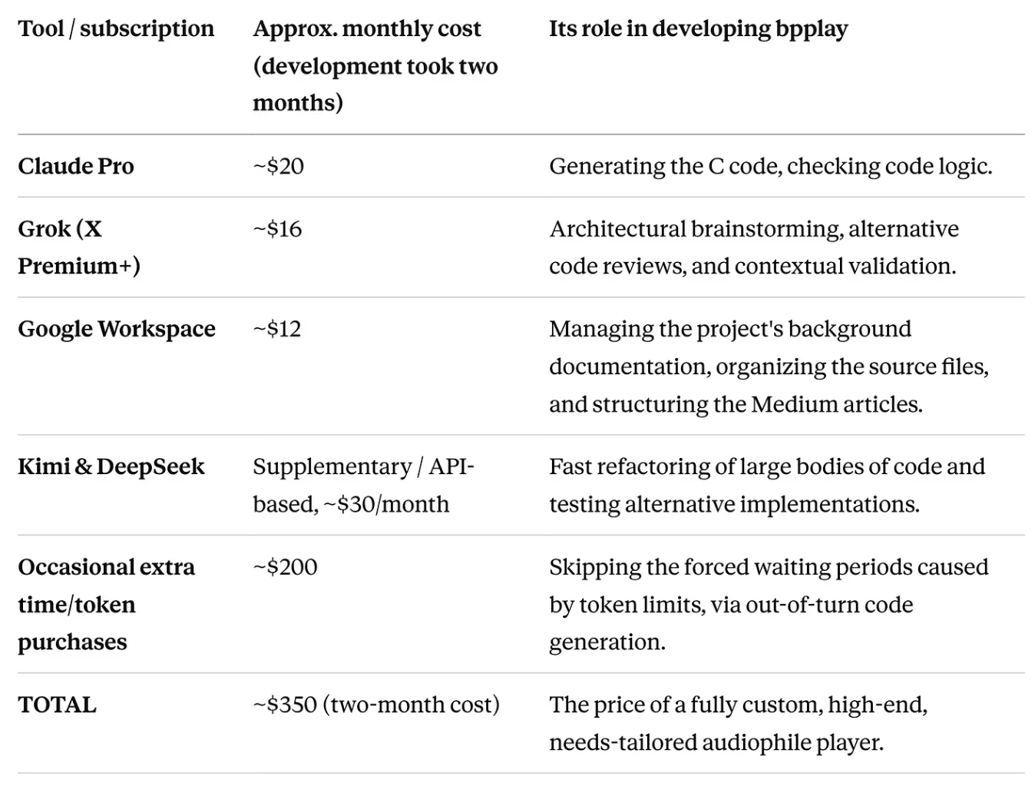
So in total, over the two-month process, it came to about $350 — roughly 120,000 forints. Development of the HQConv software may still take a few more weeks.
Was it worth it?
Absolutely.
It is a highly instructive process if you are curious not only about whether X sounds better than Y, but also want to understand what actually happens inside the computer during playback.
I have decided to make it available as open source, free of charge, for anyone to use.
Postscript from Positive Feedback:
Ferenc has told me that the installer file and instruction manual for macOS is currently available for free download on the bpplay page at GitHub: https://github.com/ferenckoscso/bpplay
A short video showing how the installation should be done will be available in a few days.
Update August 16, 2026: The Apple notarized bpplay version is now available. You can find it here: https://github.com/ferenckoscso/bpplay/releases/tag/v0.9.7
Update August 21, 2026: Ferenc has posted a brief interactive introduction to bpplay that provides an easy to understand explanation about what this minimalist, bit-perfect music player is designed to accomplish and how it works. This introduction is based on the implementation written for macOS. HERE