Our friend Ferenc Koscsó has been breaking down barriers yet again. Audiophile, recording engineer, and founder of My Reel Club in Budapest, Ferenc has always probed deeply to understand, and help others understand, what is actually happening with our digital audio systems. Two years ago, Ferenc graciously permitted Positive Feedback to repost his probing article Do Streaming Services Have a Sound? In that article, Ferenc discussed some of the issues that may exist in our home systems that influence how we experience (hear) different streaming services. It's a thought provoking study on the issues involved.
Today, he is engaged in a different pursuit that is most intriguing—a minimalist, bit-perfect music player, written in C, with a single purpose: to deliver the music file data stream to the DAC by the shortest, most deterministic path, untouched, in its original form. His efforts offer an open-source, free to use, program for both the macOS and Linux that he calls bpplay ("bit perfect play"). Read on...
bpplay: uncompromising computer-audio architecture and software minimalism
By: Ferenc Koscsó
Original article posted HERE. Reposted with Ferenc Koscsó's kind permission.
Bit-perfect macOS music player, and the question that led to building it — Part 1

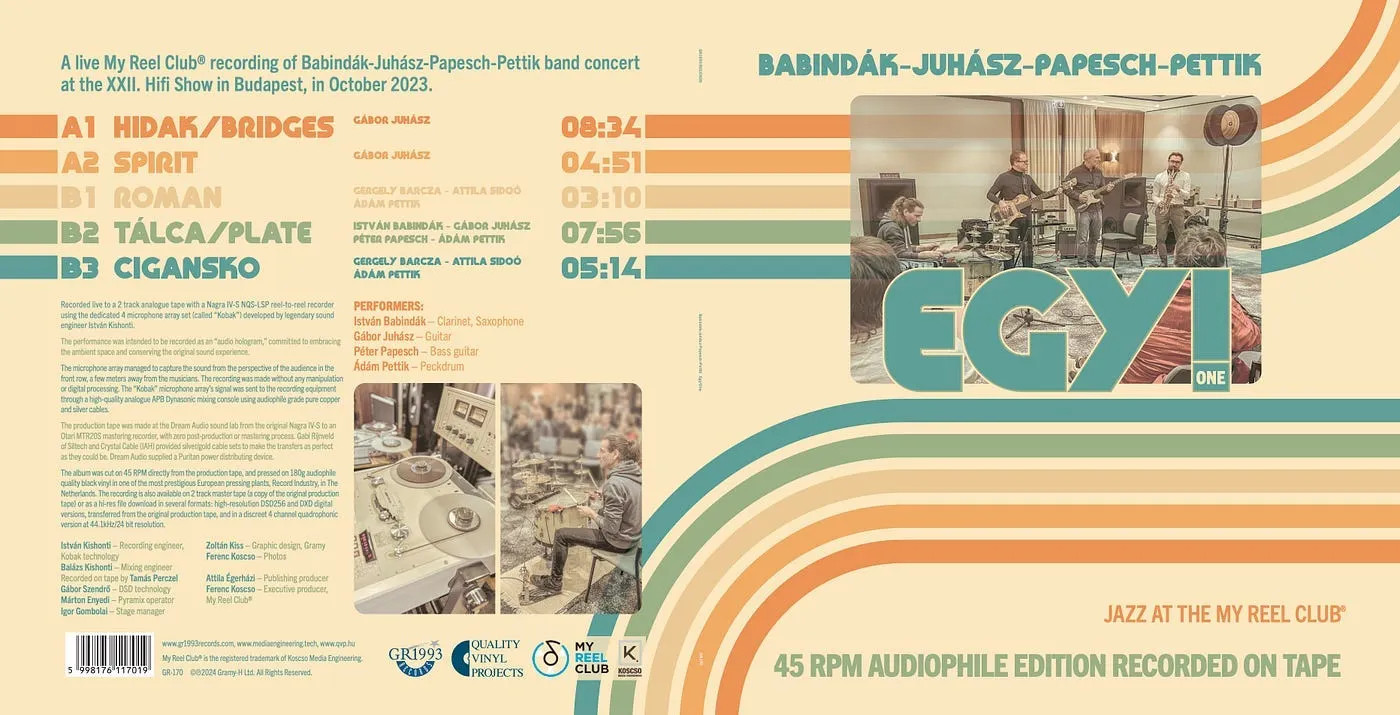
In the age of loud, over-processed commercial recordings, few things cut against the mainstream more sharply than invoking the recording practice of the 1950s and 60s: the best thing you can do to a recording is often to do nothing to it at all. We try to capture the performance in its original form, with just a few microphones, as if it were a hologram. For the My Reel Club® albums this is simply reality: whether on LP, tape, or even a high-resolution digital release, we avoid post-processing in every form, because every further intervention, every superfluous link in the chain, can only degrade it.
The question follows naturally: can this principle be translated to the world of computer-based digital playback?
bpplay is an experiment to answer that question. A minimalist, bit-perfect music player for macOS, written in C, with a single purpose: to deliver the samples of a music file to the DAC by the shortest, most deterministic path, untouched, in their original form. What that means in practice, and why such a tool might be worthwhile—even though something similar already exists—is what this piece is about.
Two things we never know for certain
Before turning to the technical side, it is worth pausing on a paradox that runs in the background of the whole experiment.
The audiophile life unfolds under a peculiar tension. On one hand, enormous energy goes into making the signal "clean": expensive cables, power filters, jitter-free clocks are all marshalled in defence of purity. On the other hand, there are two things we never know for certain—and it is precisely these two that determine what purity, what fidelity, can even mean.
The first: we do not know what the recording’s creators heard when the master was finished. On what monitors, in what room, at what volume was it decided that "this is right?" A recording is a sequence of decisions made in a specific listening situation, and there is no later access to that reference. Fidelity, then, is fidelity to an original that no one knows precisely.
Strange, isn’t it?
The second: we do not know what the computer is doing during playback. A modern machine runs dozens of processes at once. In the background the operating system indexes, scans the network, and pages memory, all while the audio mixer resamples and mixes, as described a few lines above. By the time the signal reaches the DAC, it has passed through an opaque, hard-to-predict software machine whose inner workings are essentially invisible to us.
The first paradox cannot be helped. The second, however, can. The chain may not be made perfect, but it can be made known and predictable. If every step is visible, then exactly what happens between the file and the DAC can be followed.
bpplay does not promise that it "sounds better." It promises that you can know what happens during playback.
What does a music player application usually do?
It is worth clarifying what bpplay is minimalist relative to.
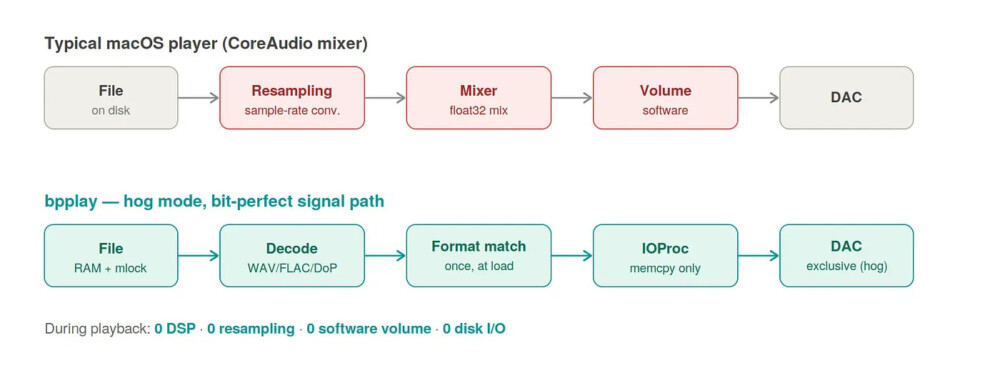
(Infographics generated by an AI)
When you listen with an ordinary macOS application, the sound does not reach the DAC directly; it passes through the system’s audio mixer, a part of the CoreAudio subsystem. A great deal can happen to it there: resampling, floating-point mixing, software volume control. In most situations these steps are convenient and useful—several applications can sound at once, the volume is adjustable, and everything simply works.
So when we play a high-resolution audio file on a modern operating system, the path to the digital-to-analogue converter is usually an opaque black box. In audiophile and engineering circles, two fundamental questions almost never get a deterministic answer:
- Is the transfer bit-perfect? Do the binary data stored in the source file (in our example, the PCM-encoded samples) reach the hardware interface fully and unmodified?
- Is playback timing-coherent? Do background operating-system processes, disk operations, and CPU scheduling introduce microscopic timing errors—so-called software jitter—as the samples are sent out?
Most commercial players sacrifice end-to-end determinism on the altar of convenience features. The connection between hardware and software thus becomes a multi-layered, asynchronous, and unpredictable process. To understand why bpplay's approach is needed, it helps to look at how a "typical" media player works.
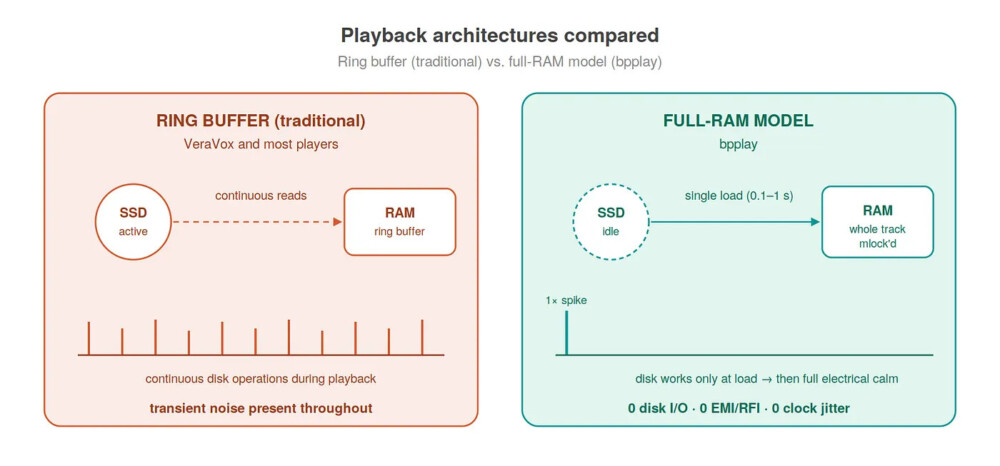
- Continuous I/O load: software reads the audio file from storage (be it even an NVMe SSD) in small buffers, piece by piece. This generates constant file-system operations and hardware interrupts (IRQs) throughout playback.
- Real-time decoding: the processor cores wrestle with continuous, tiny load spikes as they unpack compressed formats (e.g. FLAC, ALAC) into a raw PCM stream in real time. This constant context-switching can modulate the system clock and the noise level on the power rails.
- The operating system's mixer engines: under default settings, the data pass through the system's internal audio mixer (Windows Audio Engine, macOS CoreAudio, or Linux PipeWire/PulseAudio). These software layers often resample the frequency arbitrarily, apply dither, or share the audio resources with the sounds of system notifications.
If the goal is for exactly what the production approved to reach the DAC—bit for bit, sample for sample—then these same steps are already in the way. Each one is a place where the signal can change, and where the processing can generate incidental noise.
bpplay therefore bypasses the entire intermediate layer. It takes control of the DAC (hog mode), so no other application can access it, switches off mixing, and passes the samples through a direct, real-time callback (IOProc) with the fewest possible operations on the critical path. No software volume, no dither, no sample-rate conversion. Volume and every further step are left to the device designed precisely for it: the DAC and the amplifier.
When conversion does have its place
It is important, however, that this not become a religious dogma. "No conversion at all" is not an end in itself; the real goal is for the DAC to receive the ideal data, the ideal signal—the format on which it performs best. For most modern DACs that is precisely the native, untouched material, and in that case bpplay's approach is self-evident.
But not every DAC is like this. Many converters convert internally anyway: a delta-sigma DAC, for instance, transforms every incoming PCM stream into its own high-rate internal representation before turning it into analogue. If that internal conversion is of modest quality—the computational capacity in the DAC's chip is limited—then it can happen that a carefully chosen, computer-side upconversion or PCM→DSD transformation yields a better end result than leaving the work to the DAC. The computer can work with orders of magnitude more resources and more sophisticated algorithms than the DAC's internal circuitry.
This seemingly contradicts the bit-perfect principle, but in fact it only reframes it. The difference lies not in the presence or absence of conversion, but in whether it is a conscious, controlled decision or a hidden, unsolicited system intervention. A conversion chosen deliberately, with knowledge of the specific DAC—one that drives the DAC at its ideal operating point—is entirely consistent with the philosophy of a deterministic signal path. bpplay represents the purist extreme, because its value lies in auditability and its reference character; but the broader principle is not the denial of conversion, but that nothing in the chain should happen without our approval.
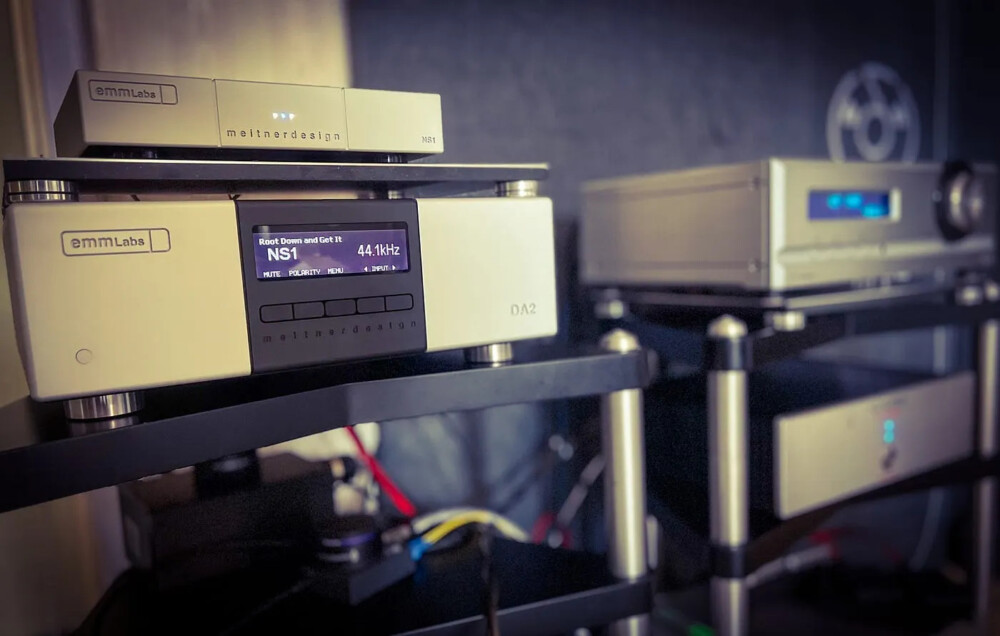
The whole piece of music into memory
One of bpplay's most important properties—and the one that sets it apart from most players—is how it loads. The entire track is loaded into memory before a single sound is heard. There is no in-flight buffering, no disk reading during playback: the whole track (or playlist) sits in RAM, pinned there so the operating system cannot even page it out (mlock), and from there it reaches the DAC with a single copy in memory. We might call this RAM-based monolithic buffering.
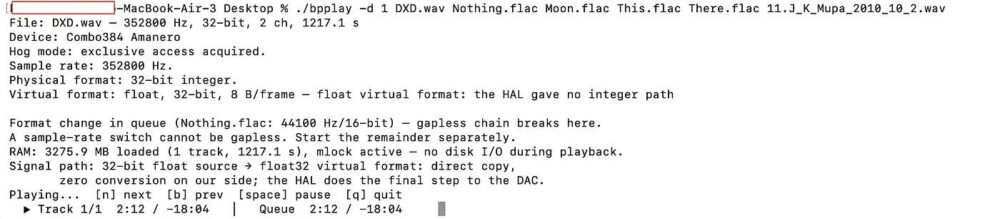
The benefit is tangible. During playback the disk is silent—there is no I/O, and none of the tiny interruptions caused by storage activity. In a typical test setup, the source SSD/HDD can hang on the very same Thunderbolt/USB chain as the DAC, and this is entirely immaterial, since there is no need to read from storage during playback. By then the music is already in memory.
All of this has a price, and that price is paid in memory: owing to the format matching at load time, and in the case of DSD, the DoP packing. A high-resolution DSD album can occupy several gigabytes: a 4 GB DSD256 file can become as much as 7.5 GB after loading. At first this looks like waste, and it surely surprises many. Yet it is exactly the price of a clean, deterministic signal path—and most importantly, it does not degrade the sound: the signal remains bit-for-bit untouched. Why the size swells precisely this much, and why this involves no loss, will be one of the topics of the next, technical part of this series.
Playback "comes with noise"
The full-RAM model has a consequence that goes beyond mere predictability.
A typical player keeps the machine working continuously during playback. It reads from disk or SSD, decodes the compressed format, manages buffers, and if memory is tight, is forced to page as well. Each operation imposes a brief, spike-like load on the processor and on storage, and through them on the machine’s power supply.
This is where it gets interesting. Modern computers' switched-mode power supplies are load-dependent: when the CPU suddenly starts decoding, or the SSD begins a read, the instantaneous current draw jumps, then falls back just as quickly.
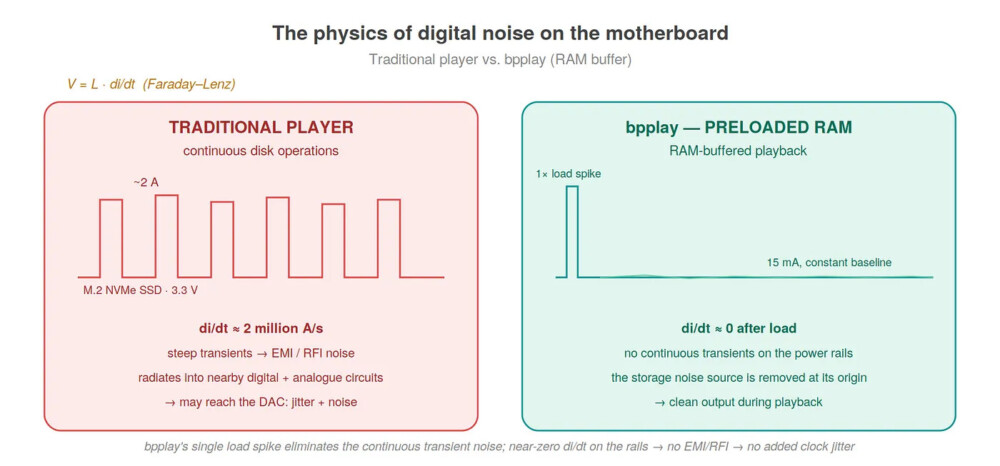
(Infographics generated by AI)
These steep transients can, in principle, generate high-frequency noise—RF/EMI—that can propagate along the power rails, through a ground loop, or by radiation, and can become a disturbing factor in the environment of a sensitive DAC located near the machine or powered from the bus. The same effect is reinforced by interrupt handling, the waking of background processes, and memory paging: each draws a small, irregular load pattern onto the machine’s electrical behaviour.
(Infographics generated by AI)
Whether this noise causes an audible difference in a given chain depends strongly on the DAC’s design. A galvanically well-isolated DAC with its own power supply is built precisely to suppress such disturbances. bpplay therefore does not claim that it "sounds better because of this." Its claim is more modest and more defensible: the full-RAM model eliminates the noise source itself, at its origin. If the track is already in memory, there is no disk reading, no decoding, no paging during playback—which means the load spikes that could generate noise in the first place never arise. The cleanest answer to a disturbance source is always for it never to come into being at all.
On the orders of magnitude of noise
So that the phenomenon does not remain abstract speculation, it is worth looking at real numbers. Take a modern, high-speed M.2 NVMe SSD—a PCIe Gen 4 or Gen 5 drive.
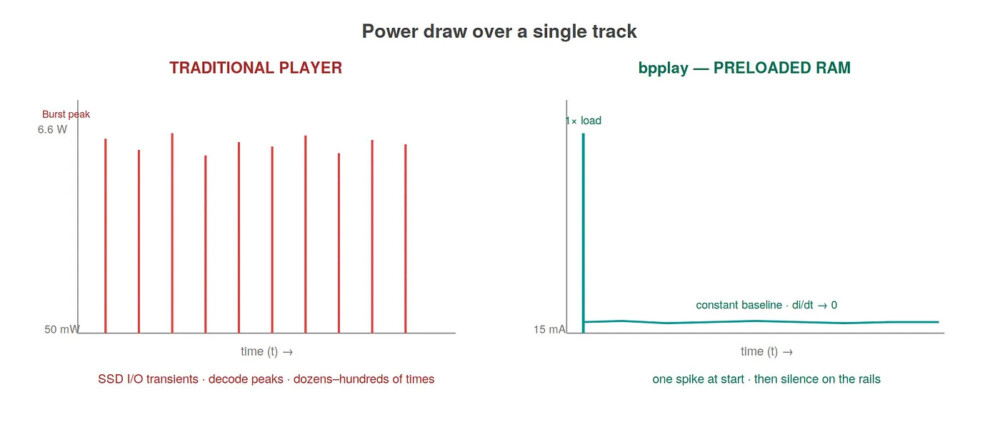
In energy-saving idle, such a device draws merely 50 milliwatts, that is, roughly 0.05 watts. But the moment the player fetches a new data block, the controller and the NAND flash chips “spin” up to full speed within microseconds, and consumption jumps to 6–7 watts—and in extreme burst operations even to 9–10 watts. Since the M.2 socket runs at a fixed 3.3 volts, translated into the language of current this means:
- Idle current draw: approx. 15 mA
- Active read peak: approx. 2000 mA (2 A)
The key, however, is not the peak value itself, but how it is reached. This roughly 130-fold jump does not happen gradually, but as a transient, almost instantaneously—within roughly a single microsecond. The rate of change of current (di/dt)—which is the decisive quantity for inductive voltage fluctuation and for radiated electromagnetic noise—is then:
di/dt ≈ (2 A − 0.015 A) / 0.000001 s ≈ 1,985,000 A/s
Nearly two million amperes per second. From the motherboard's point of view this is a steep electromagnetic impulse, which can cause a momentary voltage sag on the local capacitors, while the high-frequency component sweeping along the traces can modulate the surrounding digital and analogue circuits.
This is where it becomes clear what bpplay's model offers. A traditional player, during a single 3–4 minute track—depending on buffer size—forces the SSD into this drastic oscillation between 15 and 2000 milliamperes dozens or even hundreds of times. With bpplay this spike essentially occurs only once: in the first moments of the track starting, as the content is read into memory.
From there the SSD’s current draw settles to the resting, near-constant level, the di/dt approaches zero, and this particular noise source—the storage transients—practically disappears for the duration of playback. The rest of the machine of course keeps working; but one of the chain's steepest, most frequently recurring electrical disturbance sources falls silent, precisely when the music is playing.
"But this has already been done"
There is at least one other macOS player, VeraVox, that espouses almost word for word the same philosophy: the signal, untouched. Hog mode, IOProc, DoP, no DSP. The picture, however, is more nuanced, and in two directions.
On one hand, VeraVox is a polished, albeit still beta-stage product: with a graphical interface, measurement tools, web remote control, many formats — serious and accomplished work. bpplay, by contrast, was not made to be a product, but an experiment, a proof of concept, whose value lies precisely in its simplicity. A single C file, zero external dependencies, every line of it visible and verifiable. Anyone who wants to understand how to play music bit-perfectly on macOS can read bpplay’s source from beginning to end in a single afternoon. It is not the commercial success that matters, but understanding the processes and learn the lesson.
On the other hand, bpplay has a genuinely different and fundamentally important decision: the full-RAM model already mentioned. Most players—including VeraVox—use a so-called ring buffer and read from the file during playback as well, in 50-100 MBs or so chunks. bpplay does not do this: in a single step, with ordered priorities, it loads everything, and from then on the disk does no more work.
(Infographics generated by AI)
This is a measurable difference, not merely a matter of taste.
What is not in bpplay?
bpplay's character is perhaps easiest to grasp by measuring it against what most people know. Roon, Audirvana, and HQPlayer are mature applications, and they do a great many things that bpplay deliberately does not:
- No library management, no media management. No cover art, no metadata browsing, no "discover" function. bpplay plays files and folders, nothing more.
- No graphical interface. In place of Roon's visual world and Audirvana's elegance stands a Terminal window (or, in the appropriate playback mode, not even that).
- No network streaming, no multi-room playback. Roon's RAAT, the network renderers—all of this is absent from the Core.
- No signal processing. HQPlayer's entire art revolves around upsampling, sophisticated digital filters, modulators—bpplay is the exact opposite: zero signal processing, and that is precisely the point.
- No volume, no tone control, no mixing. All of this is left to the DAC and the amplifier.
The list may at first even look surprising. In reality, though, the picture is different: every missing function is at the same time a place where the signal could change, or into which an unpredictable software step—and its noise consequence—could wedge itself between the file and the DAC. bpplay lacks these not because there was no time for them, but because their absence is the very goal.
A reference, not a competitor
Here emerges what is perhaps bpplay's most interesting use—the one that distinguishes it from the programs above not in function, but in role.
Consider the situation of getting to know a new DAC. You can hear something: a character, a colour, a sense of space. But how can you tell whether this is the DAC's own—or the recording's—and not perhaps the trace of some hidden step in the player software? Most programs place an opaque curtain between the file and the DAC, and if the path itself is unpredictable, then the judgement formed about the DAC becomes unpredictable too.
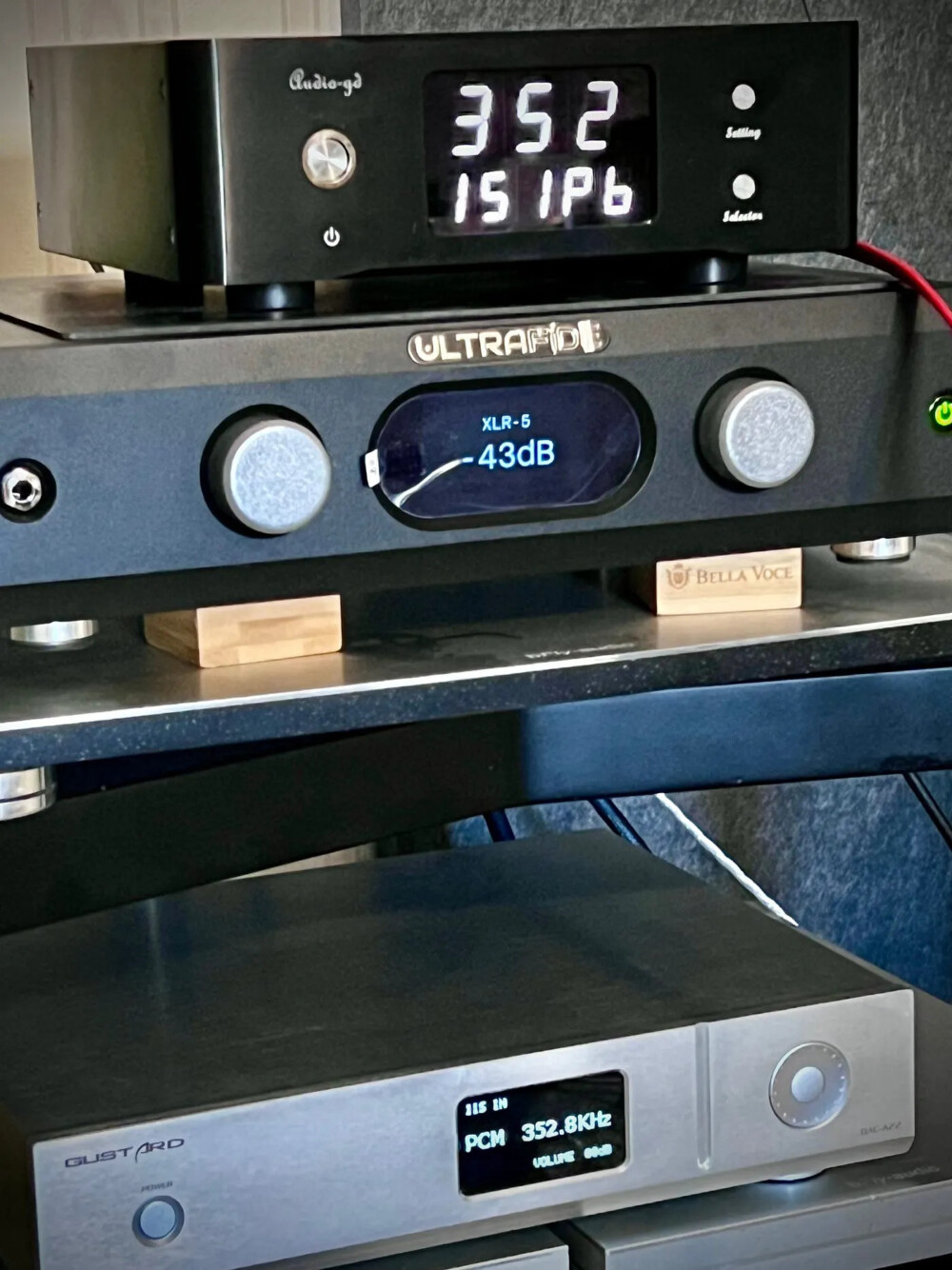
With bpplay this uncertainty factor drops out. Since the path from file to DAC is known, deterministic, and intervention-free, the result you hear is far more cleanly the DAC’s own work. The software makes the chain predictable, so the DAC's true capabilities—and limitations—show themselves more honestly.
This role aligns precisely with our record-publishing practice. My Reel Club® recordings are made in a known way, without post-production: it is known exactly what is in the groove or on the tape, since the recording, too, was done in-house, usually in front of an audience. Now a player software of similar austerity, working deterministically, joins them. Together the two form a complete, known test chain: a known source material, a predictable player, and at the end the single unknown worth examining—the new DAC itself.
bpplay thus gives up the beautiful interface and the convenience features, but in exchange offers something else: a reference. A fixed point against which to measure. That is precisely why it is not a competitor to Roon or HQPlayer—it has a different job. Those are about comfortable, everyday listening; bpplay is about making it possible to know what the rest of the chain, after the computer, is doing.
A second experiment within the experiment
bpplay has a layer that has nothing to do with the sound, yet is an instructive part of the story.
There is, after all, no software-development background behind the project in the usual sense: the starting point is engineering and media-technology experience, not the writing of real-time audio code in the depths of CoreAudio.
bpplay was created with the collaboration of a language model, Claude Opus 4.8.
BUT!
What was prompted was not "build an audiophile bit-perfect player."
The architecture was given in advance: the full-RAM model, hog mode, the intervention-free signal path. And the features were given too: DoP support, gapless playback, format segmentation. These decisions followed from hi-fi principles and practical experience, not from the model. The model was a partner in the implementation—in the labyrinth of the CoreAudio API, in bit-accurate code, in debugging.
This is itself an experiment, the other experiment within the player: what is it like when someone with firm ideas but no developer routine builds serious software with the help of a language model? The DIY (Do-It-Yourself) movement has always been popular among discerning, non-engineer music listeners.
Now the time of DIY software seems to be arriving too: we can tailor the important elements of computer-based music listening to our own needs.
Experience in this case shows that the idea works surprisingly well, provided the vision and the judgement are there. The model does not replace the vision, only speeds up its realisation. The decisions—what to leave out, what belongs to the clean signal path, what is superfluous ornament —must be made, throughout, by a human. And it is precisely these decisions that make bpplay what it is. Since the first prompt, the whole process has taken roughly two weeks.
This experience probably deserves a separate piece of writing, but it belongs here too, because bpplay is not merely a player, but also a snapshot of how software can be made today — and of how operating-system developers support (or indeed hinder) discerning computer-based music listening.
Who is it for?
bpplay's Core edition is not for everyone. As noted a few lines above, it has no graphical interface—it starts from the Terminal and is controlled with keys. In exchange, it does exactly what it promises, and every decision it makes is transparent.
It is for those interested in what actually happens between the file and the DAC; who value a tool that does exactly as much as it must and nothing more; who like that the code itself can be verified. And especially for those who compare or get to know DACs, and want a player that does not weigh in on the judgement—a fixed reference point in their own chain.
What bpplay Core can do today
It is summary of the current, hardware-validated state of the Core edition. Everything listed here has been confirmed working on real DACs (XMOS, and an Amanero Combo 384/768 interface), up to DSD256.
Supported formats
- WAV (integer PCM, 16/24/32-bit)
- FLAC (lossless, via an embedded single-header decoder)
- AIFF / AIF (lossless PCM, big-endian, converted once at load)
- DSF (DSD), played as DoP — DSD64, DSD128, and DSD256
- Float and integer stream variants are both handled
- Multi-channel wav and .dsf supported
- MQA handling, supporting on-device MQA processing
The signal path
- Exclusive hardware access (hog mode)—no other application can touch the DAC
- Direct CoreAudio HAL access via a real-time IOProc callback that does only memcpy
- No software volume, no dither, no resampling, no DSP of any kind
- Automatic sample-rate switching to match the file, so the system resampler never runs
- One-time, lossless format matching at load; the real-time path stays a pure copy
The full-RAM model
- The entire track (or playlist) is loaded into memory before playback begins
- The buffer is pinned with mlock, so the OS cannot page it out
- Zero disk I/O and zero decoding during playback
DSD handling
- Automatic DoP: the .dsf extension enables DoP packing without any flag
- DSD64 / DSD128 / DSD256, rate-independent (the DoP carrier scales with the rate)
- A friendly warning at very high DSD rates, in case the DAC cannot follow
Playback and convenience
- Gapless playback between tracks of the same format and rate
- Recursive folder traversal: drop a folder (or several) and it plays everything inside, in album order, to unlimited depth
- Multi-rate albums are automatically split into clean, separate playback segments
- A short anti-click ramp at the start and end, to protect the chain
- Sleep prevention during playback (the Mac will not idle-sleep mid-album)
- Keyboard control from the Terminal: next, previous, pause, quit (Advanced Siri based remote will happen)
Engineering character
- A single C file plus a few header-only dependencies—zero external libraries
- Compiles cleanly with one make, no warnings
- Every line of the signal path is visible and auditable
- MacOS 10.15 or newer supported
- Minimum RAM required: 8 GB
What is deliberately not here—a graphical interface, library management, network streaming, and any form of signal processing—as described in the article above, their absence is the point.
Those who, on the other hand, want a feature-rich player with a beautiful interface, many formats, for comfortable everyday listening—for them there is Roon, Audirvana, HQPlayer, the (beta, but already capable) VeraVox, or any of the more serious players. bpplay does not compete with them—its role is different. Ultimately it is the embodiment of a single principle: that the best thing you can do to the signal is often to do nothing to it at all.
The next part will look under the hood: what the bit-perfect signal path actually looks like, what DoP means for DSD, why a 4 GB file becomes 7.5 GB in memory—and why this is no loss—and how bpplay handles the various formats on a single, clean chain.
(Second part coming soon)