A couple weeks ago we reposted Ferenc Koscsó's article introducing a minimalist, bit-perfect music player, written in C, with a single purpose: to deliver the music file data stream to the DAC by the shortest, most deterministic path, untouched, in its original form. His efforts offer an open-source, free to use, program for both the macOS and Linux that he calls bpplay ("bit perfect play"). You can read that original article HERE.
Now, with Ferenc's permission, we repost his second article in this series in which he discusses what really happens "under the hood" of this bit-perfect music player.
bpplay: What Happens Under the Hood? (Part 2)
By: Ferenc Koscsó
Original article posted HERE. Reposted with Ferenc Koscsó's kind permission.
The Bit-Perfect Signal Path, DoP, and Format Management - Part 2
The first part concluded by establishing that bpplay does not promise to “sound better”. Instead, it guarantees complete transparency regarding what happens during playback. This is not a marketing slogan; rather, it is the result of a series of concrete design decisions that we will now unpack step by step:
- How the bit-perfect signal path actually functions
- What DoP (DSD over PCM) means when playing DSD files
- Why a 4 GB file expands to 7.5 GB in memory, while maintaining perfect bit-accuracy
The Actual Signal Path
We will also discuss format handling, specifically how bpplay manages mixed playlists where gapless playback is not possible, and explore the technical benefits of loading entire tracks into memory before playback begins.
In a standard macOS CoreAudio setup, the signal traverses multiple layers where it can be altered:
File → Resampling → Float32 Mixer → Software Volume → DAC
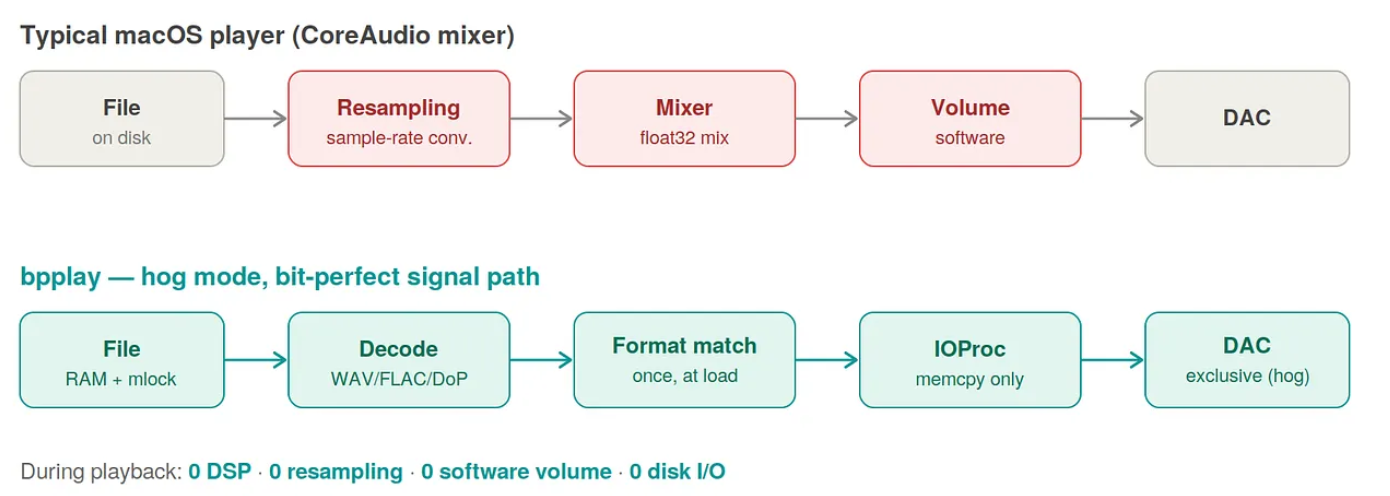
The bpplay architecture bypasses this entirely using an exclusive “hog mode” signal path:
File → Decoding → Format Matching → IOProc → DAC
Device Allocation:
Upon launch, bpplay takes exclusive control of the DAC from the CoreAudio system via the macOS "hog mode" mechanism . This guarantees that no other application can interfere, the system mixer is disabled, and system notification sounds are forced onto a different audio output. This is a mandatory, hardware-level resource reservation. The terminal confirms this with:
"Hog mode: exclusive access acquired"
Format Negotiation with HAL: CoreAudio’s lowest layer is the Hardware Abstraction Layer (HAL). The software queries the HAL to determine the DAC’s capabilities at the target sample rate, specifically looking for an integer physical format. If available, bpplay selects it, ensuring the virtual format remains integer-based without needing intermediate floating-point conversions. If the HAL dictates that the device only supports a float32 format at that specific rate, bpplay accepts it and logs the chosen path.
Loading and One-Time Format Matching: The entire audio file (whether WAV, FLAC, AIFF, or DSF) is loaded directly into memory. Any required lossless format conversions (to match the DAC’s virtual format) occur at this stage, running on a normal-priority, non-real-time thread before the DAC starts.
Memory Lock (mlock): To ensure the operating system does not swap the memory data to disk, bpplay utilizes the mlock() system call. This guarantees the audio buffer remains physically in the RAM. During playback, there is strictly zero disk I/O, zero SSD activity, and consequently, zero electromagnetic interference (EMI) generated by NVMe storage transients.
macOS Core Audio vs. Linux ALSA Direct
The current macOS version of bpplay communicates with the USB DAC via Core Audio. The upcoming Linux version will utilize ALSA direct access, introducing a deeper architectural shift in how data travels from RAM to the USB DAC buffer.
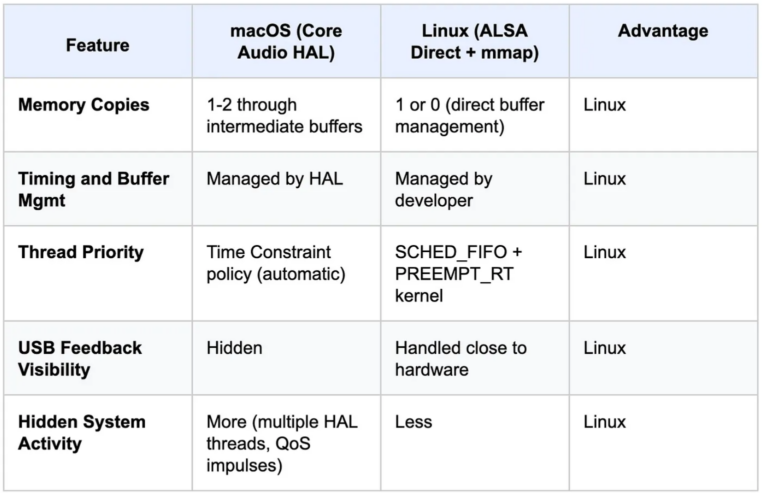
Let us examine how the two operating systems handle the data path from the system RAM to the USB DAC buffer, and what this implies for noise, predictability, and control.
1. macOS — Core Audio HAL (Current Implementation)
The application registers an IOProc callback. When the system invokes this function, the code executes a straightforward memcpy to copy the preloaded audio data into the memory area provided by the HAL (outData->mBuffers[i].mData).
However, multiple layers operate in the background:
- The memcpy writes to an intermediate, lower-capacity buffer managed by CoreAudio.
- The HAL forwards the data to the kernel’s USB audio driver via a high-priority thread utilizing the Time Constraint policy.
- The kernel driver converts the data into USB Request Blocks (URBs) and transmits them to the USB controller.
Characteristics:
- High Abstraction (“Thick”) Layer: This is a closed architecture; it prevents direct intervention in the pipeline, meaning neither the USB feedback nor the low-level timing can be influenced by the bpplay application.
- Multiple Memory Copies: There are several memory copy operations within the system, although macOS optimizes this process.
- HAL-Centric Management: Timing and buffer management are largely handled by the HAL rather than the application. While this results in minimal CPU utilization, the lack of transparency in the pipeline is the trade-off for this convenience.
Linux — ALSA Direct + mmap (Planned Architecture)
On Linux, utilizing ALSA in mmap mode with direct access significantly shortens the data path.
The ALSA kernel driver allocates DMA (Direct Memory Access) buffers. These are mapped into the application’s memory space using the mmap() system call. Consequently, the memcpy operation writes directly into the memory region from which the USB controller reads via DMA.
Characteristics:
- Low Abstraction (“Thin”) Layer and Zero-Copy Potential: The intermediate buffer utilized by the HAL is eliminated; the memory address written to by the software is physically identical to the one read by the hardware interface.
- Deterministic Configuration: Thread priority (SCHED_FIFO) and memory locking (mlockall) are entirely defined by the application.
- Enhanced Developer Control: Management of the timing loop is handled directly by the application. This shifts architectural responsibility, as the developer, rather than the operating system, must determine the optimal configuration.
In modern asynchronous USB DACs, the device transmits data back to the computer regarding the consumption rate of its internal buffer via feedback packets. This mechanism is critical because the DAC’s local clock does not perfectly synchronize with the host computer’s clock. Based on this feedback, the host adjusts the transmission rate of the audio data to prevent buffer overflow or underrun (which would manifest as audible artifacts or distortion).
- On Linux, the lower-level kernel driver (ALSA) receives and processes the DAC feedback directly.
- On macOS, this is managed by a significantly higher abstraction layer (the CoreAudio HAL).
As a result, the Linux architecture operates closer to the hardware, with fewer abstraction layers separating the data from decision-making processes. Theoretically, this can yield more precise timing and fewer implicit system operations.
Implications for the bpplay Architecture
The core philosophy of this design is to minimize hidden software processes during playback. On macOS, the HAL performs numerous operations implicitly (including timing, buffer management, and feedback handling). With Linux ALSA Direct, these operations move closer to the external hardware, offering superior control and potentially reducing redundant CPU and system activity.
The macOS implementation already minimizes software-induced noise by preloading all data into RAM and executing minimal operations during active playback. However, the CoreAudio HAL remains a high-abstraction layer that communicates with the hardware via its own threads and internal buffers.
The Linux ALSA Direct version introduces an opportunity to further streamline this layer. Minimizing memory copies, establishing more direct access to the DMA buffer, and gaining greater control over timing can potentially achieve even lower and more predictable system activity during playback.
At this stage, utilizing SCHED_FIFO alongside a real-time Linux kernel (PREEMPT_RT) transitions from a theoretical possibility into a concrete functional advantage. This approach increases the likelihood of reproducing exactly what is stored in the source files, mitigating the potential impact of extraneous system noise and added jitter on the playback process.
The USB Interface Buffer Hierarchy
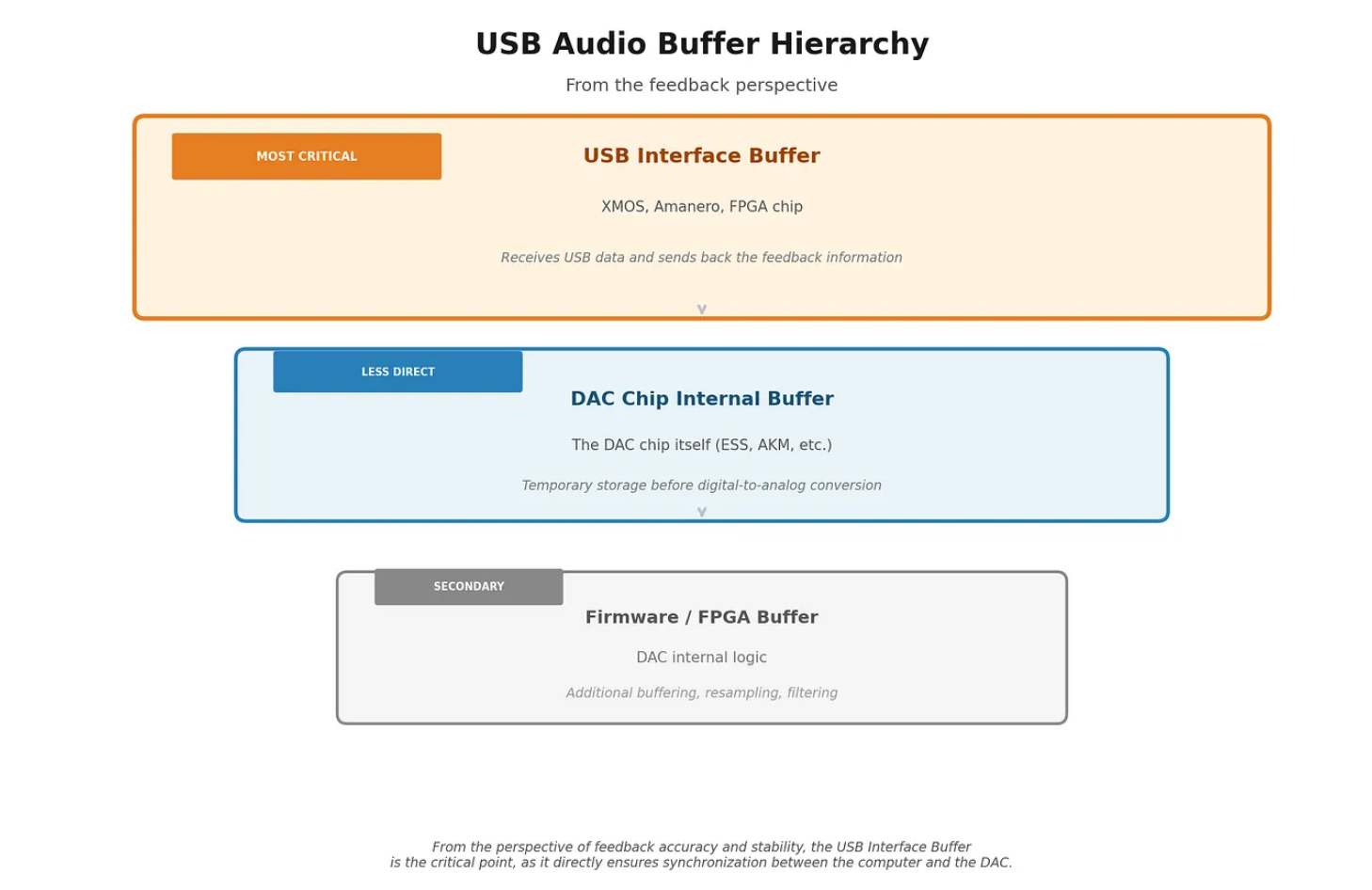
A typical USB DAC features multiple buffer layers.
(Click on image to enlarge)
Why the USB Interface Buffer is Key
The operation of asynchronous USB audio relies on the USB interface (such as an XMOS or Amanero chip) continuously reporting the consumption rate of its buffer to the host computer. Based on this feedback, the computer (via the ALSA or CoreAudio driver) modulates the data transmission rate.
Consequently, when describing a potential “DAC buffer underrun,” the critical point of failure is typically the buffer of the USB interface (XMOS, Amanero, etc.). The buffer of the actual DAC chip resides further down the signal chain, is usually larger, and serves a different purpose, such as clock synchronization and filtering.
- USB DAC Buffer: In this context, this primarily refers to the buffer of the USB interface. This specific buffer provides the feedback loop to the computer and is susceptible to underruns or overflows if the feedback mechanism is poorly managed.
- DAC Chip Buffer: The buffer of the actual DAC chip (ESS, AKM, etc.) remains secondary from the perspective of host-side transmission feedback.
IOProc: Real-Time Determinism
The real-time audio output of every CoreAudio-based application is driven by the IOProc: this is a callback function invoked by the system approximately every millisecond—dictated not by the application, but by the hardware audio clock. This call is strictly real-time: it cannot wait, it cannot stall, and it cannot request resources from the system.
The IOProc in bpplay executes exclusively one operation: a memcpy, which copies the pre-decoded data—already residing in memory and matched to the DAC's virtual format—into the buffer allocated by the HAL for the DAC. There are no floating-point calculations, no dynamic memory allocations, no file reads, and no locks. Only a single memory copy occurs—exactly what is sufficient to ensure the determinism of the signal path.
This leads to one of the most essential design decisions of bpplay:
loading and playback are two completely separate phases.
During the loading phase, all operations are permitted: file reading, FLAC decoding, DoP packaging, and format matching. These all run on the main thread before the DAC has started. During the playback phase — within the IOProc—these operations are strictly prohibited. The two phases communicate via variables: the main thread can read the current position, and the user can press "n" to skip to the next track, but the IOProc never waits and never blocks.
Click- and pop-free stopping requires specific handling. When a track ends, the IOProc buffer must be filled somehow. The obvious solution—dropping the signal immediately to zero—causes a voltage jump that is perceived as an audible click at the DAC output. Therefore, bpplay implements a 1024-frame linear fade-out: from the amplitude of the final audio frame, it gradually reduces the signal to zero, frame by frame, over approximately 23 milliseconds at 44.1 kHz. This is sufficient for the output to smoothly reach the zero level—and everything occurs in a silent domain, outside the actual musical content. The same logic applies to pausing: bpplay handles the interruption not with an abrupt mute (which would cause a DC-offset jump and a pop at the peak of a waveform), but with an immediate, short fade-out. Thus, pressing the pause button ('p') executes seamlessly, without loading the output or causing a pop.
DoP: Packaging the DSD Bitstream
The first part mentioned that bpplay also supports DSD—handling DSF files in DoP mode up to DSD256. Under the hood, this is one of the most elegant structures: a protocol that encapsulates data within another format without altering a single bit of the original content.
What is DSD?
PCM audio files (WAV, FLAC, AIFF) rely on time-based samples: at every sampling interval, a discrete number — encoded in 16, 24, or 32 bits—defines the value of the analog signal. DSD (Direct Stream Digital) is fundamentally different: it stores 1-bit samples at an extremely high frequency using delta-sigma modulation. For DSD64, the sample rate is 64 times 44.1 kHz, which is 2.8224 MHz; for DSD128, it is 5.6448 MHz; and for DSD256, it is 11.2896 MHz per channel.
In the majority of USB audio interfaces, this bit density cannot be transmitted directly: the standard audio transmission protocol expects PCM data with a specified bit depth and sample rate. DoP provides the solution to this problem.
The Structure of the DoP Standard The DoP (DSD over PCM, v1.1) protocol is surprisingly simple. It packages exactly 16 DSD bits into a single 24-bit PCM sample: the lower 16 bits of the sample contain the actual DSD payload (8 bits from the first time slot, 8 bits from the second), while the upper 8 bits form a marker byte that alternates between 0x05 and 0xFA.
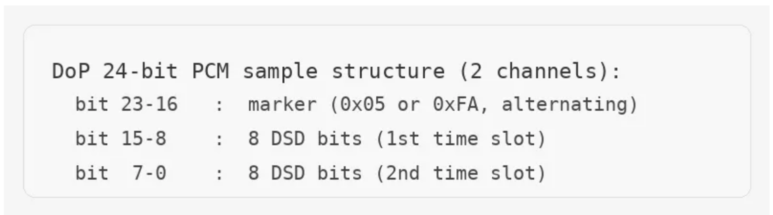
Because every PCM sample carries 16 DSD bits, the sample rate of the carrier PCM is exactly one-sixteenth of the original DSD rate: 176.4 kHz for DSD64, 352.8 kHz for DSD128, and 705.6 kHz for DSD256. This is exactly what bpplay reports to the DAC—not "DSD64," but rather "24-bit, 176.4 kHz PCM," which internally contains the DoP structure.
The alternating marker byte acts as the safety valve for the entire system. If the DAC supports DSD via DoP and detects the strict alternation of 0x05 and 0xFA, it unpacks the DSD bits and routes them to its internal DSD decoder. The audio content then reaches the analog stage directly, without any intermediate conversion. If the alternation is interrupted for any reason—for example, if the DAC receives a non-DSD file—the DoP decoder remains passive and treats the incoming stream as standard PCM. There are no sudden bursts of static or loud buzzing; it simply does not unpack the DSD. Therefore, the marker is not merely a format identifier: it is a robust, self-verifying handshake.
Why Not Native DSD?
The macOS CoreAudio architecture does not recognize native DSD transport; there is no API available to instruct the system to "transmit this as DSD bits to the DAC." As a result, DoP is not a compromise, but physically the only viable pathway through CoreAudio. DoP packaging does come with overhead, but—crucially—not at the expense of signal quality. The 16 DSD bits that bpplay embeds into the 24-bit frame are bit-for-bit identical to the data within the DSF file. The DoP frame serves solely as a transport protocol, leaving the underlying content completely unaltered.
Why Does 4 GB Become 7.5 GB?
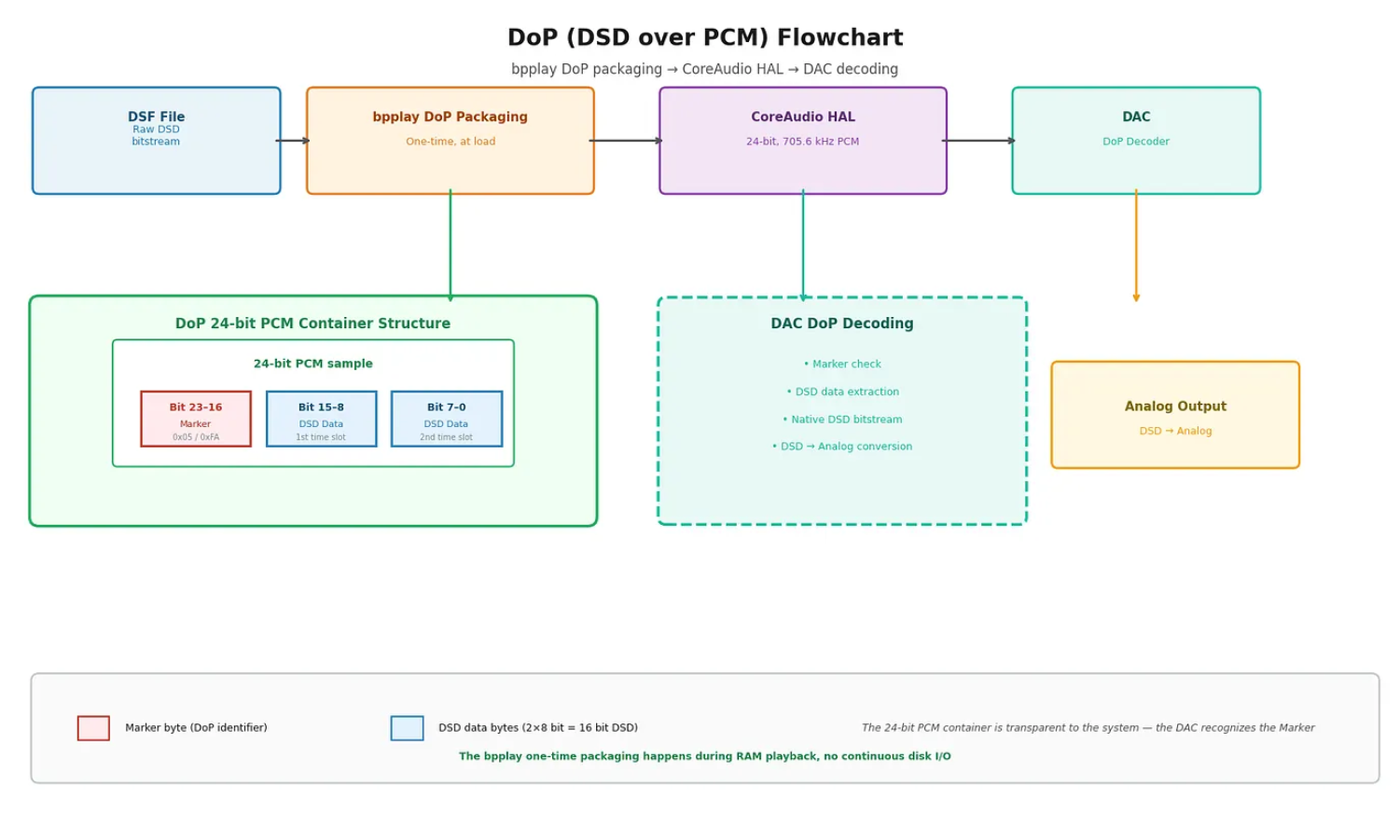
As noted in the first part, bpplay demands an unusually large memory footprint, particularly when handling DSD files. The DSD256 example was highly specific: a 4 GB file can expand to occupy up to 7.5 GB in RAM upon loading. This is neither a measurement anomaly nor inefficient resource management—it is the cumulative result of two consecutive, mathematically predictable, and strictly lossless transformations.
(Click on image to enlarge)
Step 1: DoP Packaging (×1.5) The bit rate of raw DSD256 is 11.2896 MHz per channel. For two channels, the data rate is calculated as follows: 11,289,600 × 2 channels / 8 bits = 2,822,400 bytes/second.
Following DoP packaging, the carrier PCM stream is 24-bit, operating at 705,600 Hz across 2 channels: 705,600 Hz × 3 bytes/sample × 2 channels = 4,233,600 bytes/second. The ratio is: 4,233,600 / 2,822,400 = a 1.5x increase. This constitutes the "overhead" of the DoP marker byte: one indicator byte is introduced for every two DSD bytes. The DSD bitstream remains unaltered—only the transport encapsulation has expanded in size.
Step 2: The HAL Float32 Path (×1.333) The line observed on the terminal screen in the previous section:
"Signal path: 32-bit float source → float32 virtual format: direct copy, zero conversion on our side; the HAL does the final step to the DAC."
This message is the result of the negotiation between the DAC and the CoreAudio HAL. bpplay attempts to secure the integer mode: in this scenario, the 24-bit DoP samples are sent directly to the DAC without an intermediate float conversion step. If the HAL indicates that the device only provides a float32 virtual format at the given rate (which is particularly common at 705.6 kHz), bpplay accepts this path. It converts the 24-bit integer samples to float32 according to the IEEE 754 standard—losslessly, because the float32 mantissa is 24 bits, meaning a 16- or 24-bit integer can be represented exactly.
This conversion, however, entails a data size increase: from 3 bytes/sample to 4 bytes/sample. The ratio is 4/3 = a 1.333x increase.
The Complete Formula The product of the two steps: 1.5 × 1.333 = exactly a 2.0x increase compared to the raw DSD data.
In a 4 GB DSF album, the actual DSD data is slightly less than 4 GB: headers (the DSD chunk, fmt chunk, and data chunk headers totaling a few hundred bytes) and block alignment dictated by the DSF standard occupy some space. Therefore, the actual DSD bitstream is approximately 3.75 GB, which translates to 3.75 × 2.0 = 7.5 GB in memory. This correlation is not a coincidence.
What is worth emphasizing once again: Both steps—the DoP packaging and the float32 conversion—execute exactly once during the loading phase, entirely outside the real-time thread. During playback, this processed data simply resides in memory, and the IOProc reads from it using memcpy. The underlying DSD content remains bit-for-bit intact.
Format Segments: When Gapless is Not Gapless
One of the most pragmatic—and least conspicuous—decisions in bpplay is the handling of mixed playlists.
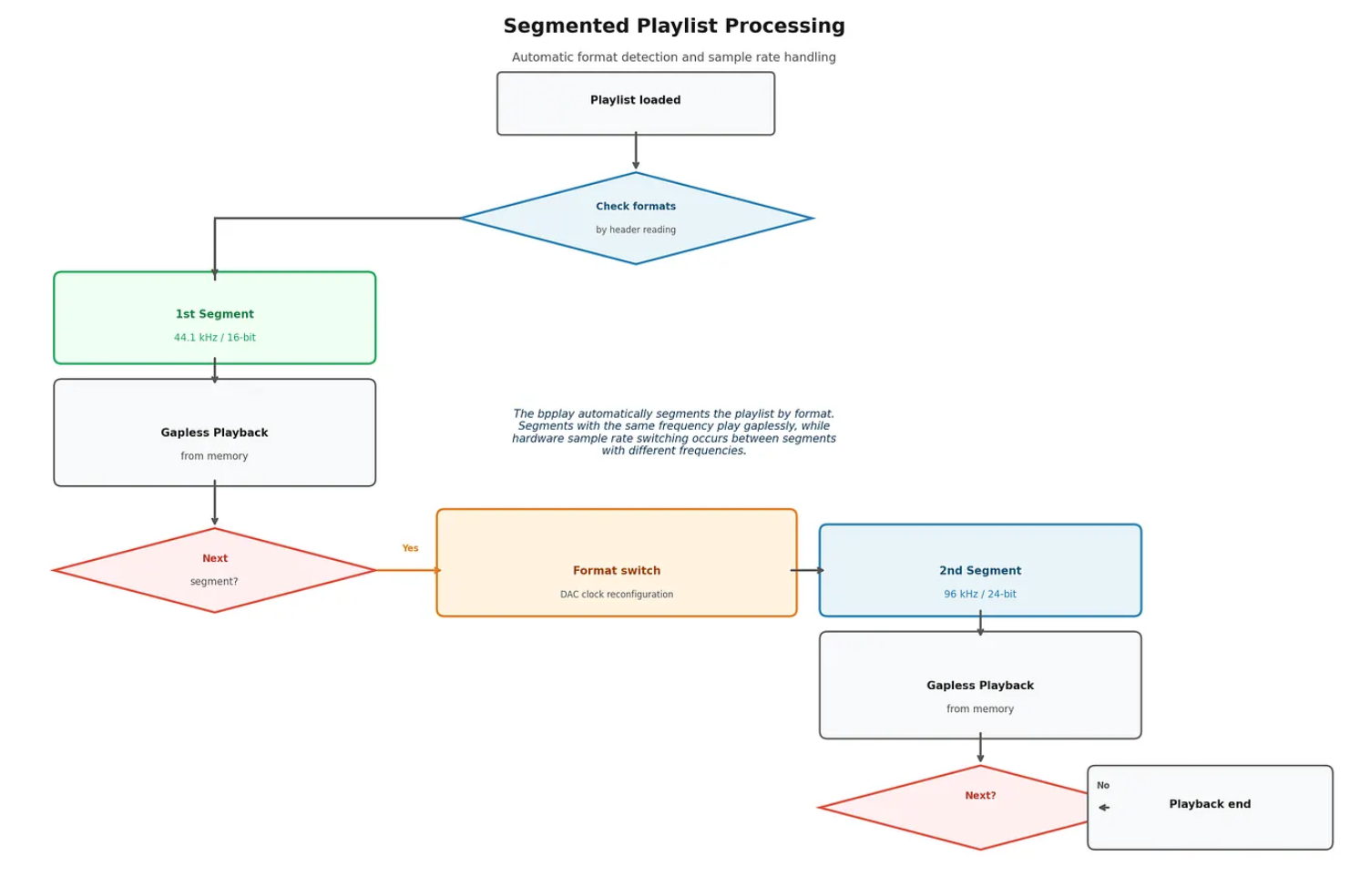
The Problem Gapless playback implies the complete absence of clicks, pauses, or moments of silence between two tracks. In bpplay, this is an inherent feature: when the data for one track is exhausted, the IOProc immediately begins copying the data for the next. There is zero overhead and zero gap.
However, this continuous stream can only be maintained if consecutive files share identical formats: the same sample rate, the same bit depth, and the same channel count. If the rate suddenly changes within the sequence — for example, if a 44.1 kHz FLAC is followed by a 96 kHz WAV — the DAC must be reconfigured. This is a hardware-level operation: CoreAudio must stop the active audio stream, adjust the sample rate, and then restart the stream. This restart is physically unavoidable and inherently causes a brief pause.
The Solution: Segmentation
(Click on image to enlarge)
Before loading, bpplay scans the playlist by reading the file headers and divides it into distinct format segments. Within a single segment, all files share an identical sample rate, bit depth, and channel count — consequently, these tracks receive gapless playback. At the segment boundary, a clean configuration change occurs, which is immediately reported by the terminal:
"Format change in queue (Nothing.flac: 44100 Hz/16-bit) — gapless chain breaks here.
A sample-rate switch cannot be gapless. Start the remainder separately."
This message encapsulates the essence of bpplay: it does not conceal what cannot be bypassed; rather, it explicitly states why and where a disruption occurs.
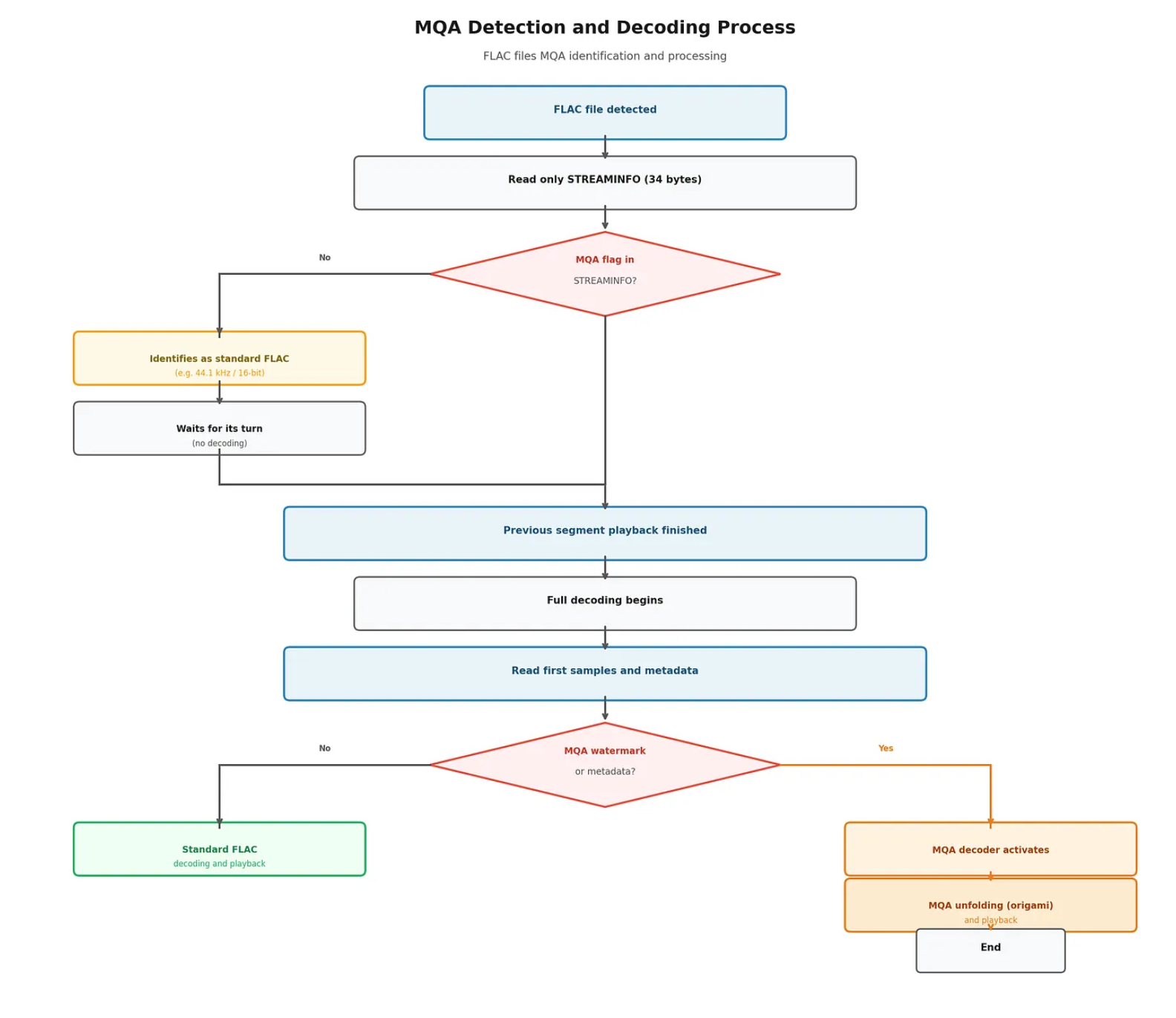
Header Reading as a Lightweight Pre-scan To delineate the format segments, bpplay reads only the file headers—not the complete audio payload. For a WAV file, this constitutes the first few dozen bytes; for FLAC, the STREAMINFO metadata block (34 bytes); for DSF, the DSD chunk and the fmt chunk (totaling 80 bytes); and for AIFF, the COMM chunk. This operation executes near-instantaneously and adds virtually zero overhead to the loading process. Full decoding is strictly reserved for the files of the upcoming segment, and it commences only after the playback of the preceding segment has concluded.
What happens if the .flac file contains MQA-processed content?
Absolutely nothing. During the header-reading phase, no MQA-specific processing occurs. The system simply identifies it as a standard FLAC file.
Why?
The explanation lies in the FLAC file structure and the operational mechanics of MQA. bpplay exclusively extracts the 34-byte STREAMINFO block. This block, part of the standard FLAC specification, contains fundamental parameters: sample rate, bit depth, channel count, and the total sample count. There are no MQA-specific markers within this block. The STREAMINFO block of an MQA-FLAC file simply reports standard parameters (e.g., 44.1 kHz/16-bit or 48 kHz/24-bit)—thus, the software correctly perceives it as a conventional, standard FLAC file at this stage.
(Click on image to enlarge)
For software to identify that a FLAC file actually contains MQA data, one of the following is required:
- Reading the ID3v2 or Vorbis comment metadata located at the end of the file (where the MQA encoder places the identifier).
- Decoding the first few audio samples. MQA utilizes an “origami” principle: high-resolution information is embedded within the lower bits of the 24-bit stream (masked by noise) and is accompanied by a specific watermark at the beginning of the file, which can only be detected during decoding.
Since bpplay strictly reads only the header during the initial phase, the ongoing process is confined to format determination. It does not parse metadata or decode audio samples.
Consequence: During the initial (header-reading) phase, the system identifies MQA as a standard 16- or 24-bit FLAC file. Actual MQA detection occurs later during the full decoding phase based on metadata. However, the unfolding (decoding) of MQA does not take place within bpplay; it is handled by the DAC, provided the DAC supports MQA decoding.
The segment-delineation phase of bpplay is intentionally lightweight, reading only file headers to quickly determine which files belong to the same gapless segment. As a result, MQA is not recognized in this early stage and is treated as standard 16- or 24-bit FLAC. Detection of MQA occurs later during the full decoding process, when the system parses the Vorbis comment metadata. Therefore, bpplay does not claim to fully evaluate the file upon loading the playlist; it extracts only what is strictly necessary for proper segment management.
The Special Case of AIFF: Byte Swapping
AIFF (Audio Interchange File Format) is structurally equivalent to WAV, utilizing a similar chunk-based architecture for uncompressed PCM, with one fundamental distinction: AIFF stores samples in big-endian byte order. The most significant byte (MSB) is positioned first, whereas WAV and CoreAudio use little-endian order, where the least significant byte (LSB) comes first.
bpplay addresses this during loading by reversing the byte order for each sample. Reversing the three bytes of a 24-bit sample (A–B–C → C–B–A) is mathematically lossless, representing the exact same numerical value read in a different sequence. Although this step is mandatory, it does not compromise bit perfection. The underlying bit sequence remains identical; only the physical byte order is adapted to match what the CoreAudio HAL expects. The "bit-perfect" designation thus remains valid.
The Integer Path vs. the Float32 Path
The reader may reasonably ask: under what conditions does the signal path achieve integer mode, and when is it forced to rely on float32?
The answer depends on the DAC firmware and the internal decision-making processes of the CoreAudio HAL. bpplay queries the HAL for available physical formats at the target sample rate and identifies the lowest integer bit depth that is at least equal to that of the source file. If the DAC supports this and the virtual format can also be set to integer, the chain remains purely integer-based: zero floating-point computation occurs, resulting in a bit-exact data transfer.
If the HAL enforces a float32 virtual format, bpplay reports this accordingly:
Physical format: 32-bit integer.
Virtual format: float, 32-bit, 8 B/frame—float virtual format: the HAL gave no integer path
Signal path: 32-bit float source → float32 virtual format: direct copy,
zero conversion on our side; the HAL does the final step to the DAC.
Float32 is lossless for 16- or 24-bit PCM, since the float32 mantissa is 24 bits, meaning the 16/24-bit integer range can be represented exactly within it, without any rounding errors. A true, bit-exact integer chain nevertheless differs technically from this: in integer mode, not a single conversion step is executed after loading, neither in the source format nor in the transport format.
Known limitation—macOS USB and 32-bit integer
On macOS, the audio system (CoreAudio) exposes a floating-point (float32) intermediate format to applications on USB-attached DACs, even when the DAC also offers an integer format. This is decided at the system level, not in the player. bpplay always reports this honestly in its signal-path line: the Virtual format: float line shows when the output virtual format is floating-point. In practice:
- 16- and 24-bit content (WAV, FLAC, AIFF, DSD/DoP , MQA): bit-accurate, because it fits exactly
- within the 24 bits of effective precision of the float32 intermediate. The MQA signalling passes through intact, and DSD appears as DSD on the DAC’s display.
- 32-bit integer source: the lowest few bits may be lost in the float intermediate. This is a single, deterministic, controlled conversion — in this case the Signal path: line reports a single controlled conversion rather than full bit-accuracy. It affects few users, as 32-bit integer sources are uncommon (most studio masters are 24-bit integer or 32-bit float).
You can inspect your DAC’s available formats with the -fmts option—it prints which physical formats the device offers and what the current virtual format is. The limitation belongs to the macOS USB audio system. On non-USB paths—for example a Ravenna/AES67 network audio interface—it does not occur: there the full signal passes through untouched.
Beyond the Bits: The Machine as a Noise Source
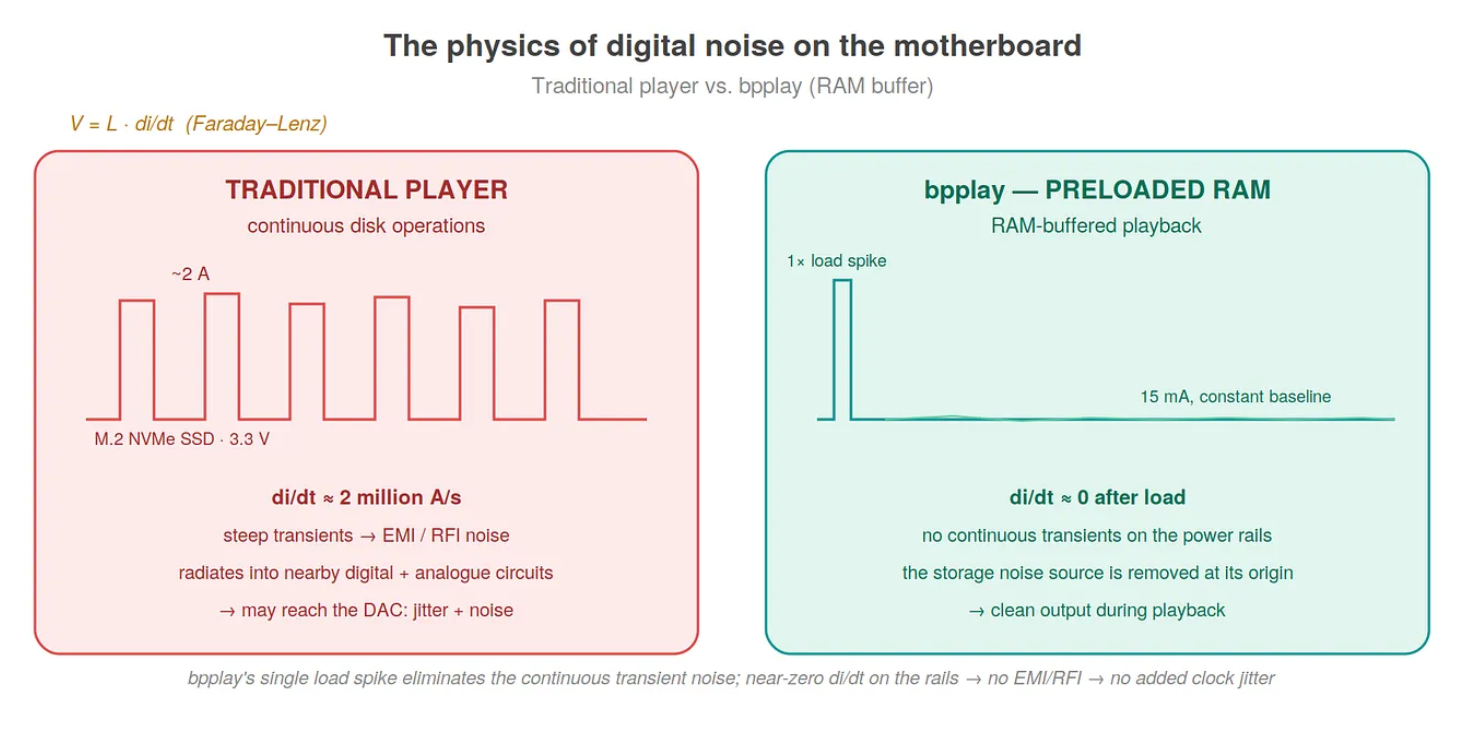
Thus far, the discussion has focused on the signal path—bits, formats, and conversions. However, the full-RAM model has a consequence that manifests not in bits, but in electrons. As discussed in the first part, modern switching-mode power supplies are load-dependent, and a read spike from an NVMe SSD can jump from 15 milliamperes to 2 amperes within microseconds—representing a current transient ($di/dt$) of nearly two million amperes per second. This steep transient can generate high-frequency RF/EMI noise on the power rails and through radiated pathways, which can become a disturbing factor in the environment of a DAC positioned close to the computer or powered via the bus.
The SSD, however, is merely one—and perhaps the most illustrative—noise source. To fully understand the rationale behind the full-RAM model, it is worth examining what a computer does during playback, and which of these activities can or cannot be adapted to the requirements of audiophile playback.
Processor Load Fluctuation
A conventional player decodes the compressed format in real-time. The continuous decompression of a FLAC or ALAC file involves small, repetitive load peaks on the processor cores. While this inherently consumes little power, the dynamic voltage and frequency scaling (DVFS, turbo boost) of modern CPUs turns every such load peak into a frequency and voltage transition. The core switches up and down between clock states, and each transition introduces a load transient on the power line—the same phenomenon observed with the SSD, albeit with a smaller amplitude and higher frequency.
The full-RAM model eliminates this noise source as well. Once the track is loaded and decoded, the processor has virtually no further tasks: the IOProc executes only a memcpy, which is one of the simplest operations that can be requested from a CPU. The cores can settle into a low, stable clock state and remain there—there is no decoding fluctuation to drag the frequency up and down. The load is generated predictably, exactly when required by the music.
Interrupts and Context Switches
Every disk read generates hardware interrupts (IRQs): the storage medium signals to the processor that the data is ready, and the processor interrupts its current activity to handle it. Each interrupt constitutes a context switch, and every context switch introduces a small, irregular load pattern. A conventional player, which reads from the storage medium in chunks over a period of 3 to 4 minutes, maintains this stream of interrupts throughout playback.
If there are no disk operations during playback, these interrupts simply do not occur. It is not that bpplay "handles interrupts better"—it simply does not invoke the hardware that would trigger them. The cleanest solution to a noise source remains preventing its creation in the first place. The primary vulnerability of the widely used ring-buffer architecture is the so-called buffer underrun, where even a single missed disk read or CPU spike can cause an audible click or a momentary silence. The full-RAM model physically excludes this possibility of failure: once loading is successful, no software or hardware event can occur during playback to delay data utilization.
Memory Paging (Swap)
When memory is scarce, the operating system writes less frequently used pages to the storage drive (paging/swap). This again results in disk activity and its associated transients. The mlock() call in bpplay guarantees that the audio buffer remains physically in RAM and cannot be paged out. The 8 GB minimum memory requirement is precisely why this figure is not arbitrary: the entire track, along with the format matching applied upon loading (including the expanded DoP+float32 buffer in the case of DSD), must fit comfortably so that the system does not need to perform paging.
Paging, however, is not entirely within bpplay’s control: other system processes can still trigger page-outs. What bpplay can do—and does—is remove its own audio data from this equation. Naturally, the user must also contribute to the overall stability of the system: no unnecessary background tasks should be running if optimal results are desired.
The Display and the GPU—The Cost of the Graphical Interface
This is where the decision to omit a graphical user interface becomes more than an aesthetic or philosophical choice. A player that renders VU meters, spectrum analyzers, or animated album art refreshes the screen at least 60 times per second. This keeps the GPU and the display pipeline constantly active, introducing its own power consumption and load fluctuations—yet another regular, non-negligible noise source in the electrical behavior of the machine.
The status line of bpplay in the terminal refreshes five times per second (the internal loop runs every 40 milliseconds and writes every fifth cycle). Five text updates per second without GPU involvement—as opposed to re-rendering sixty full frames. The difference is of several orders of magnitude. The "unappealing terminal window" is therefore not merely the omission of convenience features; it is a deliberate reduction of display activity as a noise source.
What Cannot Be Silenced Within the Machine
The background operating system—indexing, network daemons, system maintenance—continues to function. These are independent of bpplay. bpplay does not force the system into a sleep state (it merely prevents idle sleep during playback for reliability reasons) and does not interfere with system processes. It simply ensures that it does not add to the noise itself: it performs no disk reads, no decoding, and no screen rendering during playback.
The bpplay source code includes a solution for this: the main thread is assigned to QOS_CLASS_UTILITY so as not to compete with the real-time audio thread—not to accelerate button presses, but precisely to suppress background activity.
pthread_set_qos_class_self_np(QOS_CLASS_UTILITY, 0);
The code comment itself notes that this is purely resource management, not an intervention affecting sound quality; the bit-perfect data remains identical, and its practical impact on macOS is minimal because the real-time thread is already protected. Priority management will have real stakes in the planned headless Linux build, where SCHED_FIFO provides true scheduling priority. This type of self-restraint—specifying what does not actually matter—is just as indicative of bpplay's approach as concrete figures.
Bus activity—the periodic traffic of USB isochronous audio transmission—also remains: software cannot eliminate this because it is the transmission channel itself. Handling the associated noise is the responsibility of the DAC; a galvanically well-isolated, self-powered digital-to-analog converter is designed precisely to suppress these disturbances. Thus, bpplay does not solve every issue; it only quiets what can be silenced via software on the computer side.
Once the musical material is loaded into memory and format matching is complete, virtually all activity that would cause regular or abrupt load fluctuations ceases during playback. There is no continuous disk I/O, no decoding, and no graphical re-rendering. The IOProc performs a single operation: copying from memory to memory. This operation presents such a low and predictable load that the processor cores can remain in a stable clock state. The machine becomes electrically "quieter."
This stability is particularly interesting from a clock perspective. Although bpplay cannot directly influence the DAC’s internal clock, minimal system load can indirectly have a positive effect on jitter. Large and rapid load variations not only cause power supply fluctuations but can also induce minor instabilities in the system clock distribution—especially when there is no galvanic isolation between the computer and the DAC. The minimalist operation of bpplay attempts to suppress this noise source as well. It does not claim to eliminate jitter—the majority of jitter originates within the DAC’s own clock circuitry anyway—but at least it avoids adding unnecessary external disturbances.
One cannot meaningfully discuss jitter without clarifying the most fundamental question: during playback, where does the clock signal that times the analog voltage from digital samples originate? The answer for most modern, high-quality USB DACs—and within the chain used to validate bpplay (which tested TT DAC and Gustard DACs via XMOS and Amanero Combo384/768 interfaces)—is clear: the DAC is the clock master, not the computer.
These USB interfaces utilize asynchronous USB transmission. The essence of the asynchronous mode is that the timing of the digital-to-analog conversion is controlled by the DAC’s own local crystal oscillator—typically two oscillators, separated for the 44.1 kHz and 48 kHz base rate families. The computer does not dictate the conversion pace; on the contrary, the DAC continuously signals to the machine via a feedback endpoint the rate at which it consumes data, and the computer adjusts its transmission accordingly to ensure the DAC’s input buffer neither empties nor overflows.
This arrangement has far-reaching consequences. The sample rate configured in CoreAudio is actually only a nominal value; the actual pace determining the sound is provided by the DAC clock. Furthermore, the frequency of the IOProc calls themselves—previously described as invocations "based on the hardware audio clock"—is ultimately driven by the DAC: the asynchronous feedback rate dictates when the HAL requests a new batch of data. Therefore, even the tempo at which data is requested from bpplay aligns with the DAC's clock, not the computer's.
It follows that timing fluctuations in the data path—the kind of "software jitter" mentioned in the first part—do not reach the conversion clock in a well-engineered asynchronous DAC. The DAC’s input buffer and its local oscillator isolate all scheduling inaccuracies of the computer in the time domain.
If the DAC is the clock master and the asynchronous buffer absorbs timing errors in the data path, it is reasonable to ask: does near-zero power load during playback have any relationship to jitter at all? Yes, but not where or how one might initially assume. It is worth separating the types of jitter.
Random (Gaussian) jitter stems from the crystal oscillator’s own phase noise and thermal noise. This is an intrinsic property of the DAC clock—bpplay has no influence over it and makes no claim to do so.
Interface or transport jitter represents temporal uncertainty in data arrival. This is isolated by the asynchronous USB buffer. bpplay ensures that the buffer is never starved, but the conversion timing is performed by the DAC, not the software.
The third category is deterministic, specifically periodic, power-induced (correlated) jitter—and this is where the scenario becomes compelling. Large and rapid load variations (the SSD and decoding transients discussed in the first part, with a di/dt approaching two million A/s) do not merely distort the supply voltage: the high-frequency component propagating along power rails and through radiated paths can couple into the power supply and reference voltages of the DAC clock circuit. A contaminated power rail can measurably degrade the crystal oscillator's phase noise and modulate the analog stage's noise floor. This is not time-domain data path jitter, but electrical pollution that can degrade the DAC's own clock and analog references—provided a coupling pathway exists: a shared ground, bus power, or inadequate galvanic isolation.
This is where the full-RAM model holds real significance regarding jitter. Fewer and smaller di/dt transients on the computer side mean that less broadband EMI and power rail noise travel toward the DAC, reducing opportunities to contaminate the DAC's clock circuit and noise floor. Let the formulation be precise: bpplay does not reduce the jitter of the DAC's own clock. It reduces the external electrical disturbance at its source that could otherwise degrade this clock and the noise floor.
Whether this has an audible consequence depends entirely on the design of the DAC. A galvanically well-isolated, self-powered DAC breaks this coupling path entirely: for such a device, host-side noise is largely irrelevant, and the practical benefit of bpplay in this regard approaches zero—which is perfectly fine, as the DAC has already accomplished this task. Conversely, with a bus-powered or inadequately isolated DAC positioned close to the computer, the coupling path remains open, and the electrical quiet can bring a measurable—and occasionally audible—difference. bpplay silences at the source; isolation blocks the remainder. The two are not competitors, but rather two ends of the same problem.
Yet the full-RAM model guarantees one crucial aspect in the data path, which is significant: the buffer never starves. The classic flaw of ring-buffer architectures, buffer underrun—where a missed disk read or a CPU spike empties the buffer, causing an audible click or a second of silence—is physically impossible during playback with bpplay. bpplay feeds the asynchronous DAC buffer deterministically and without interruption.
The approach of bpplay toward supported formats is similarly pragmatic. For DSD, DSF is currently the supported storage format alongside the DoP protocol. bpplay currently handles the .dsf (DSD Stream File, Sony) container with DoP packaging. It is important to recognize that the DoP backend itself is format-independent: once the raw, 1-bit DSD bitstream is obtained, packaging it into a 24-bit PCM frame (with the 0x05/0xFA marker) is identical regardless of the bitstream's origin. The limitation lies not in the DoP path, but in parsing the container.
The .dff (DSDIFF, Philips) format is the container of the professional and SACD authoring world—used by many SACD rips and Pyramix-based workflows. In uncompressed form, playing a .dff file is a well-defined task: after DoP packaging, the entire remaining chain is identical to the current one, requiring only a different interpretation of the container. Two specific differences exist. One is the chunk structure and the big-endian byte order. The other—and more substantial—is the bit order: the DoP standard expects DSD bits in MSB-first order within the PCM frame; .dsf stores data LSB-first, so the current DSF→DoP pathway reverses bits within the byte, whereas .dff is natively MSB-first, omitting this reversal. It is the same concept with an inverted detail. However, .dff can carry DST (Direct Stream Transfer) compression—the lossless compression format for DSD—the handling of which would require a dedicated DST decoder, representing significant additional complexity.
The .wsd (Wideband Single-bit Data) is also a raw, 1-bit DSD format, typically encountered in archiving and professional contexts. There is no theoretical obstacle to its playback, but its practical occurrence is rare.
The decision here is therefore not architectural, but a matter of prioritization. The .dsf format covers the vast majority of consumer and prosumer DSD collections; adding uncompressed .dff is a well-defined task that can build upon the existing, format-independent DoP backend; DST-compressed .dff and .wsd, however, belong to marginal libraries and receive lower priority. According to bpplay's philosophy, a new format is introduced when it holds genuine practical relevance for the target audience—not merely for the sake of completeness.
Regarding the ALAC format, it is worth clarifying a common misconception: the reference implementation of the ALAC codec has been open-source since 2011 under the Apache 2.0 license.
Why then does bpplay not play ALAC files? The primary reason is bit-level redundancy. Both ALAC and FLAC are lossless; the decoded PCM from both is bit-for-bit identical. An ALAC file therefore carries no audio quality or bit-perfection advantage over FLAC—both lead to the exact same sequence of samples. In a minimalist player focused on auditability, parallel support for two redundant, lossless codecs merely adds code surface area without any audible or measurable gain.
The second reason is container complexity. ALAC resides in an MP4/M4A (ISO BMFF) container, whose structural architecture of atoms (boxes) and sample tables is significantly more complex than a RIFF/WAVE header or a FLAC stream. Integrating an MP4 demuxer runs counter to the fundamental goal of bpplay: ensuring that the source code can be fully read and verified in a single afternoon.
The third reason is the trap of the "easy way out." The CoreAudio subsystem could decode ALAC natively (AudioConverter / ExtAudioFile), but this path would lead directly through the opaque system layers that bpplay exists to bypass, where bit perfection cannot be cleanly guaranteed. An "inexpensive" solution would therefore contradict the principle of a deterministic signal path.
Finally, the practical alternative: users with an ALAC library originating from the Apple ecosystem can convert it losslessly, without any bit loss, into FLAC. Prioritizing FLAC is thus not an ideological debate over format openness, but the result of straightforward engineering considerations: less code, a more transparent chain, and the same bit-perfect result.
Summary: A Single Spike, Followed by Silence
The power consumption of a conventional player remains spiked throughout: SSD reads, decoding peaks, interrupts, and display refreshes pull on the power rails dozens or hundreds of times during a 3-to-4-minute track.
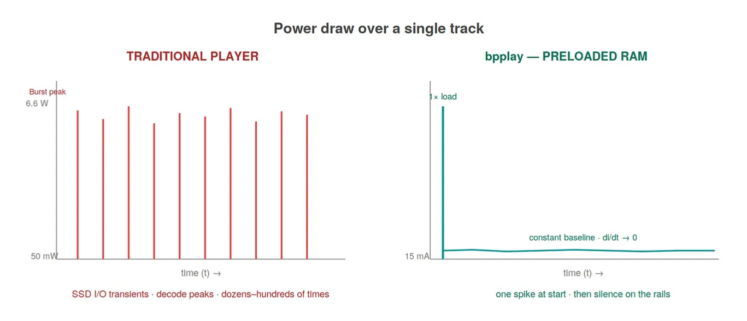
With bpplay, the multitude of spikes collapses into a single, discrete load spike at the beginning of the track, when the content is read and decoded into memory. From that point onward, power consumption settles into a low, near-constant level, di/dt approaches zero, and the machine becomes electrically quiet. Precisely while the music is playing.
Whether this introduces an audible difference in a specific playback chain, as noted in the first part, depends heavily on the design of the DAC . bpplay does not claim that "it sounds better because of this." Rather, it asserts that software-mitigatable noise sources on the computer side are eliminated at their source, leaving the remaining noise—inherent to the hardware and the transmission channel—to the component responsible for handling it: the DAC.
A Traceable, Honest Signal Chain
What has been presented above is not an abstract architectural description—it is a chain of concrete code, specific numbers, and deliberate design choices. Every step has a designation and a rationale:
- Hog mode: Necessary because bypassing the mixer requires a hardware-level resource reservation.
- One-time format matching upon loading: Critical because bringing any operation involving I/O to the real-time thread is strictly prohibited.
- mlock: Implemented because memory paging causes disk activity and subsequent power transients.
- DoP packaging: Required because there is no other path within CoreAudio to transmit DSD to the DAC.
- float32 expansion: Accepted because the HAL occasionally enforces a floating-point path rather than an integer one.
- Format segments: Employed because sample rate switching cannot be gapless; the architecture does not conceal this fact, it simply reports it.
The same logic applies below the level of bits, down to the electrons themselves. The full-RAM model not only renders the signal path deterministic but also minimizes the machine’s electrical footprint: disk I/O transients, processor load fluctuations from real-time decoding, the interrupt stream, and—by omitting a graphical interface—display activity are all eliminated at their source. What remains—background system maintenance and transmission bus traffic—falls outside the scope of the software and is left to the design of a well-engineered, isolated DAC.
Alignment with Minimalist Recording Principles
On My Reel Club® recordings, the same principle applies on a different plane. From the moment of recording, it is known exactly what is captured in the groove or on the tape: a minimal microphone setup, a direct stereo arrangement, and zero post-processing . bpplay pairs this source with a player designed with similar purism: what it does not strictly need to do, it does not do. What it must do—DoP packaging, float32 conversion, and byte swapping in the case of AIFF—it executes as a one-time, auditable step before playback even begins.
The result is not a promise, but a state: the software side is known, leaving the DAC side as the sole variable. It is precisely this state that many have sought—perhaps unconsciously—for years across various tools. bpplay is not the only answer, but it is one of the most transparent.
Topology and Hardware Validation
During development and validation, the playback chain was tested across three distinct connection topologies:
- The DAC connected directly to a MacBook Air port.
- Connected through a Sonnet Tech Thunderbolt 5 hub.
- Connected via a generic, no-name USB hub.
Both premium and generic 4-meter budget cables were utilized during the validation process. The bit-perfect behavior—encompassing correct format selection, hog mode, IOProc, memcpy, and full-RAM loading—remained identical in all three scenarios: the bit path is entirely independent of the connection method. The quality of the hub, the cabling, and the galvanic isolation affect the noise and EMI profile—this, however, as noted above, is determined by the topology and the DAC, not the software.
(To be continued in Part 3, which will explore the actual intersection of bpplay and My Reel Club® analog recordings: what such a chain reveals from a native DSD256 album, and what even the most auditable software cannot address.)
Technical References
- bpplay.c source code: A single C file utilizing the CoreAudio HAL API, compatible with macOS 10.15+.
- DoP v1.1 standard: The baseline protocol for DSD over PCM encapsulation.
- IEEE 754 float32: Incorporates a 23-bit mantissa + 1 implicit bit, allowing a 24-bit integer to be precisely represented without rounding errors.
- mlock(2) main page: The reference documentation for pinning memory pages to physical RAM.